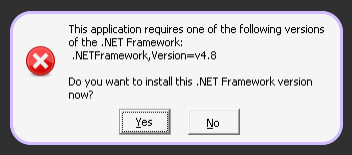
After successfully installing a local copy of Sword Coast Legends from a mounted ISO, the game will not start. Any insight would be appreciated (This is not the Steam or GoG version and is working on an actual Windows 7 machine).
Here are the generated issue details from my system (couldn’t get https://paste.ubuntu.com/ working):
lutris-issue-report.json
And here is the log from starting the game:
Started initial process 94262 from /usr/bin/umu-run /home/maxeta/Games/sword-coast-legends/drive_c/Program Files (x86)/Sword Coast Legends/SwordCoast.cdx
Start monitoring process.
[umu.__main__:78] DEBUG: DBUS_SESSION_BUS_ADDRESS=unix:path=/run/user/1000/bus
[umu.__main__:78] DEBUG: DEBUGINFOD_URLS=https://debuginfod.archlinux.org https://debuginfod.cachyos.org
[umu.__main__:78] DEBUG: DISPLAY=:0
[umu.__main__:78] DEBUG: DMS_DEFAULT_LAUNCH_PREFIX=systemd-run --user --scope
[umu.__main__:78] DEBUG: DMS_DISABLE_HOT_RELOAD=1
[umu.__main__:78] DEBUG: DMS_SOCKET=/run/user/1000/danklinux-1440.sock
[umu.__main__:78] DEBUG: DOTNET_BUNDLE_EXTRACT_BASE_DIR=/home/maxeta/.cache/dotnet_bundle_extract
[umu.__main__:78] DEBUG: DOTNET_ROOT=/usr/share/dotnet
[umu.__main__:78] DEBUG: DOTNET_TOOLS_PATH=/home/maxeta/.dotnet/tools
[umu.__main__:78] DEBUG: ELECTRON_OZONE_PLATFORM_HINT=auto
[umu.__main__:78] DEBUG: HOME=/home/maxeta
[umu.__main__:78] DEBUG: INVOCATION_ID=6bf97ddf782b49519a298e91b72ce183
[umu.__main__:78] DEBUG: JOURNAL_STREAM=10:23924
[umu.__main__:78] DEBUG: LANG=en_US.UTF-8
[umu.__main__:78] DEBUG: LC_ADDRESS=en_US.UTF-8
[umu.__main__:78] DEBUG: LC_IDENTIFICATION=en_US.UTF-8
[umu.__main__:78] DEBUG: LC_MEASUREMENT=en_US.UTF-8
[umu.__main__:78] DEBUG: LC_MONETARY=en_US.UTF-8
[umu.__main__:78] DEBUG: LC_NAME=en_US.UTF-8
[umu.__main__:78] DEBUG: LC_NUMERIC=en_US.UTF-8
[umu.__main__:78] DEBUG: LC_PAPER=en_US.UTF-8
[umu.__main__:78] DEBUG: LC_TELEPHONE=en_US.UTF-8
[umu.__main__:78] DEBUG: LC_TIME=en_US.UTF-8
[umu.__main__:78] DEBUG: LOGNAME=maxeta
[umu.__main__:78] DEBUG: MAIL=/var/spool/mail/maxeta
[umu.__main__:78] DEBUG: MANAGERPID=1336
[umu.__main__:78] DEBUG: MANAGERPIDFDID=24660
[umu.__main__:78] DEBUG: MANPAGER=sh -c 'col -bx | bat -l man -p'
[umu.__main__:78] DEBUG: MANROFFOPT=-c
[umu.__main__:78] DEBUG: MEMORY_PRESSURE_WATCH=/sys/fs/cgroup/user.slice/user-1000.slice/user@1000.service/app.slice/dms.service/memory.pressure
[umu.__main__:78] DEBUG: MEMORY_PRESSURE_WRITE=c29tZSAyMDAwMDAgMjAwMDAwMAA=
[umu.__main__:78] DEBUG: MOTD_SHOWN=pam
[umu.__main__:78] DEBUG: NIRI_SOCKET=/run/user/1000/niri.wayland-1.1398.sock
[umu.__main__:78] DEBUG: PATH=/usr/local/sbin:/usr/local/bin:/usr/bin:/usr/share/dotnet:/home/maxeta/.dotnet/tools:/usr/bin/site_perl:/usr/bin/vendor_perl:/usr/bin/core_perl
[umu.__main__:78] DEBUG: PWD=/home/maxeta
[umu.__main__:78] DEBUG: QT_LOGGING_RULES=*.debug=false
[umu.__main__:78] DEBUG: QT_QPA_PLATFORM=wayland;xcb
[umu.__main__:78] DEBUG: QT_QPA_PLATFORMTHEME=gtk3
[umu.__main__:78] DEBUG: QT_QPA_PLATFORMTHEME_QT6=gtk3
[umu.__main__:78] DEBUG: RUSTICL_ENABLE=iris
[umu.__main__:78] DEBUG: SHELL=/bin/fish
[umu.__main__:78] DEBUG: SHLVL=1
[umu.__main__:78] DEBUG: SYSTEMD_EXEC_PID=1440
[umu.__main__:78] DEBUG: TERM=linux
[umu.__main__:78] DEBUG: TERMINAL=kitty
[umu.__main__:78] DEBUG: USER=maxeta
[umu.__main__:78] DEBUG: VIRTUAL_ENV_DISABLE_PROMPT=1
[umu.__main__:78] DEBUG: WAYLAND_DISPLAY=wayland-1
[umu.__main__:78] DEBUG: XDG_CURRENT_DESKTOP=niri
[umu.__main__:78] DEBUG: XDG_RUNTIME_DIR=/run/user/1000
[umu.__main__:78] DEBUG: XDG_SEAT=seat0
[umu.__main__:78] DEBUG: XDG_SESSION_ID=3
[umu.__main__:78] DEBUG: XDG_SESSION_TYPE=wayland
[umu.__main__:78] DEBUG: XDG_VTNR=1
[umu.__main__:78] DEBUG: _=/usr/bin/dbus-update-activation-environment
[umu.__main__:78] DEBUG: WEBKIT_DISABLE_DMABUF_RENDERER=1
[umu.__main__:78] DEBUG: PROTOCOL_BUFFERS_PYTHON_IMPLEMENTATION=python
[umu.__main__:78] DEBUG: __GL_SHADER_DISK_CACHE=1
[umu.__main__:78] DEBUG: __GL_SHADER_DISK_CACHE_PATH=/home/maxeta/Games/sword-coast-legends
[umu.__main__:78] DEBUG: LD_LIBRARY_PATH=/usr/lib:/usr/lib64:/usr/lib:/usr/lib32:/usr/lib/libfakeroot:/usr/lib64:/home/maxeta/.local/share/lutris/runtime/Ubuntu-18.04-i686:/home/maxeta/.local/share/lutris/runtime/steam/i386/lib/i386-linux-gnu:/home/maxeta/.local/share/lutris/runtime/steam/i386/lib:/home/maxeta/.local/share/lutris/runtime/steam/i386/usr/lib/i386-linux-gnu:/home/maxeta/.local/share/lutris/runtime/steam/i386/usr/lib:/home/maxeta/.local/share/lutris/runtime/Ubuntu-18.04-x86_64:/home/maxeta/.local/share/lutris/runtime/steam/amd64/lib/x86_64-linux-gnu:/home/maxeta/.local/share/lutris/runtime/steam/amd64/lib:/home/maxeta/.local/share/lutris/runtime/steam/amd64/usr/lib/x86_64-linux-gnu:/home/maxeta/.local/share/lutris/runtime/steam/amd64/usr/lib
[umu.__main__:78] DEBUG: LC_ALL=
[umu.__main__:78] DEBUG: WINEDEBUG=-all
[umu.__main__:78] DEBUG: DXVK_LOG_LEVEL=error
[umu.__main__:78] DEBUG: UMU_LOG=1
[umu.__main__:78] DEBUG: WINEARCH=win64
[umu.__main__:78] DEBUG: PROTONPATH=GE-Proton
[umu.__main__:78] DEBUG: WINE=/usr/bin/umu-run
[umu.__main__:78] DEBUG: WINEPREFIX=/home/maxeta/Games/sword-coast-legends
[umu.__main__:78] DEBUG: WINEESYNC=1
[umu.__main__:78] DEBUG: WINEFSYNC=1
[umu.__main__:78] DEBUG: WINE_FULLSCREEN_FSR=1
[umu.__main__:78] DEBUG: DXVK_NVAPIHACK=0
[umu.__main__:78] DEBUG: DXVK_ENABLE_NVAPI=1
[umu.__main__:78] DEBUG: PROTON_BATTLEYE_RUNTIME=/home/maxeta/.local/share/lutris/runtime/battleye_runtime
[umu.__main__:78] DEBUG: PROTON_EAC_RUNTIME=/home/maxeta/.local/share/lutris/runtime/eac_runtime
[umu.__main__:78] DEBUG: PROTON_DXVK_D3D8=1
[umu.__main__:78] DEBUG: WINEDLLOVERRIDES=d3d10core,d3d11,d3d12,d3d12core,d3d8,d3d9,d3dcompiler_33,d3dcompiler_34,d3dcompiler_35,d3dcompiler_36,d3dcompiler_37,d3dcompiler_38,d3dcompiler_39,d3dcompiler_40,d3dcompiler_41,d3dcompiler_42,d3dcompiler_43,d3dcompiler_46,d3dcompiler_47,d3dx10,d3dx10_33,d3dx10_34,d3dx10_35,d3dx10_36,d3dx10_37,d3dx10_38,d3dx10_39,d3dx10_40,d3dx10_41,d3dx10_42,d3dx10_43,d3dx11_42,d3dx11_43,d3dx9_24,d3dx9_25,d3dx9_26,d3dx9_27,d3dx9_28,d3dx9_29,d3dx9_30,d3dx9_31,d3dx9_32,d3dx9_33,d3dx9_34,d3dx9_35,d3dx9_36,d3dx9_37,d3dx9_38,d3dx9_39,d3dx9_40,d3dx9_41,d3dx9_42,d3dx9_43,dxgi,nvapi,nvapi64,nvofapi64=n;winemenubuilder=
[umu.__main__:78] DEBUG: WINE_LARGE_ADDRESS_AWARE=1
[umu.__main__:78] DEBUG: GAME_NAME=Sword Coast Legends
[umu.__main__:78] DEBUG: GAME_DIRECTORY=/home/maxeta/Games/sword-coast-legends
[umu.__main__:78] DEBUG: GAMEID=umu-default
[umu.__main__:78] DEBUG: PROTON_VERB=waitforexitandrun
[umu.__main__:78] DEBUG: LUTRIS_GAME_UUID=43c27131-2761-435b-9087-803ae914b9e7
[umu.umu_run:848] INFO: umu-launcher version 1.4.0 (3.14.4 (main, Apr 11 2026, 09:31:02) [GCC 15.2.1 20260209])
[umu.umu_run:777] DEBUG: PROTONPATH is codename 'GE-Proton', defaulting to 'sniper'
[umu.umu_run:890] DEBUG: Connecting to '1.1.1.1'...
[umu.umu_runtime:267] DEBUG: Local: /home/maxeta/.local/share/umu/steamrt3
[umu.umu_proton:90] DEBUG: Sending request to 'api.github.com'...
[umu.umu_runtime:316] DEBUG: Existing install detected
[umu.umu_runtime:317] DEBUG: Using container runtime 'steamrt3' aka 'sniper'
[umu.umu_runtime:318] DEBUG: Checking updates for 'steamrt3'...
[umu.umu_runtime:368] DEBUG: Sending request to 'repo.steampowered.com/steamrt3/images/latest-public-beta/VERSION.txt?version=r9GdNlVawek0zAbJtZeIbg' for 'VERSION.txt'...
[umu.umu_proton:646] DEBUG: PROTONPATH not *-Latest, skipping
[umu.umu_proton:529] INFO: GE-Proton is up to date
[umu.umu_runtime:453] DEBUG: Acquiring file lock '/home/maxeta/.local/share/umu/umu.lock'...
[umu.umu_runtime:455] DEBUG: Acquired file lock '/home/maxeta/.local/share/umu/umu.lock'
[umu.umu_runtime:460] DEBUG: Released file lock '/home/maxeta/.local/share/umu/umu.lock'
[umu.umu_runtime:377] INFO: steamrt3 is up to date
[umu.umu_run:997] DEBUG: WINEPREFIX=/home/maxeta/Games/sword-coast-legends
[umu.umu_run:997] DEBUG: GAMEID=umu-default
[umu.umu_run:997] DEBUG: PROTON_CRASH_REPORT_DIR=/tmp/umu_crashreports
[umu.umu_run:997] DEBUG: PROTONPATH=/home/maxeta/.local/share/Steam/compatibilitytools.d/GE-Proton10-34
[umu.umu_run:997] DEBUG: STEAM_COMPAT_APP_ID=a5505942f3eb4cbfec6176d1a75512e0
[umu.umu_run:997] DEBUG: STEAM_COMPAT_TOOL_PATHS=/home/maxeta/.local/share/Steam/compatibilitytools.d/GE-Proton10-34:/home/maxeta/.local/share/umu/steamrt3
[umu.umu_run:997] DEBUG: STEAM_COMPAT_LIBRARY_PATHS=/home
[umu.umu_run:997] DEBUG: STEAM_COMPAT_MOUNTS=/home/maxeta/.local/share/Steam/compatibilitytools.d/GE-Proton10-34:/home/maxeta/.local/share/umu/steamrt3
[umu.umu_run:997] DEBUG: STEAM_COMPAT_INSTALL_PATH=/home/maxeta/Games/sword-coast-legends/drive_c/Program Files (x86)/Sword Coast Legends
[umu.umu_run:997] DEBUG: STEAM_COMPAT_CLIENT_INSTALL_PATH=
[umu.umu_run:997] DEBUG: STEAM_COMPAT_DATA_PATH=/home/maxeta/Games/sword-coast-legends
[umu.umu_run:997] DEBUG: STEAM_COMPAT_SHADER_PATH=/home/maxeta/Games/sword-coast-legends/shadercache
[umu.umu_run:997] DEBUG: STEAM_COMPAT_LAUNCHER_SERVICE=proton
[umu.umu_run:997] DEBUG: FONTCONFIG_PATH=
[umu.umu_run:997] DEBUG: EXE=/home/maxeta/Games/sword-coast-legends/drive_c/Program Files (x86)/Sword Coast Legends/SwordCoast.cdx
[umu.umu_run:997] DEBUG: SteamAppId=default
[umu.umu_run:997] DEBUG: SteamGameId=default
[umu.umu_run:997] DEBUG: STEAM_RUNTIME_LIBRARY_PATH=/home/maxeta/.local/share/lutris/runtime/steam/i386/usr/lib:/home/maxeta/.local/share/lutris/runtime/steam/amd64/usr/lib:/home/maxeta/.local/share/lutris/runtime/steam/i386/lib/i386-linux-gnu:/usr/lib64:/home/maxeta/Games/sword-coast-legends/drive_c/Program Files (x86)/Sword Coast Legends:/home/maxeta/.local/share/lutris/runtime/Ubuntu-18.04-i686:/home/maxeta/.local/share/lutris/runtime/steam/i386/lib:/home/maxeta/.local/share/lutris/runtime/steam/amd64/usr/lib/x86_64-linux-gnu:/usr/lib/libfakeroot:/home/maxeta/.local/share/lutris/runtime/steam/i386/usr/lib/i386-linux-gnu:/home/maxeta/.local/share/lutris/runtime/steam/amd64/lib/x86_64-linux-gnu:/usr/lib32:/home/maxeta/.local/share/lutris/runtime/steam/amd64/lib:/home/maxeta/.local/share/lutris/runtime/Ubuntu-18.04-x86_64:/usr/lib
[umu.umu_run:997] DEBUG: STORE=
[umu.umu_run:997] DEBUG: PROTON_VERB=waitforexitandrun
[umu.umu_run:997] DEBUG: UMU_ID=umu-default
[umu.umu_run:997] DEBUG: UMU_ZENITY=
[umu.umu_run:997] DEBUG: UMU_NO_RUNTIME=
[umu.umu_run:997] DEBUG: UMU_RUNTIME_UPDATE=
[umu.umu_run:997] DEBUG: UMU_NO_PROTON=
[umu.umu_run:997] DEBUG: UMU_CONTAINER_NSENTER=
[umu.umu_run:997] DEBUG: RUNTIMEPATH=/home/maxeta/.local/share/umu/steamrt3
[umu.umu_run:997] DEBUG: UMU_STEAM_GAME_ID=
[umu.umu_run:997] DEBUG: UMU_INVOCATION_ID=003540c608c91acb87d34f92268b68ba
[umu.umu_runtime:637] INFO: Running 'GE-Proton10-34' using runtime 'sniper'
[umu.umu_runtime:637] INFO: Running 'steamrt3' using runtime 'host'
[umu.umu_run:1008] DEBUG: ('/home/maxeta/.local/share/umu/steamrt3/umu', '--verb=waitforexitandrun', '--', '/home/maxeta/.local/share/umu/umu-shim', '/home/maxeta/.local/share/Steam/compatibilitytools.d/GE-Proton10-34/proton', 'waitforexitandrun', '/home/maxeta/Games/sword-coast-legends/drive_c/Program Files (x86)/Sword Coast Legends/SwordCoast.cdx')
[umu.umu_run:732] DEBUG: prctl exited with status: 0
ProtonFixes[94362] INFO: Running protonfixes on "GE-Proton10-34", build at 2026-03-23 03:55:11+00:00.
ProtonFixes[94362] INFO: Running checks
ProtonFixes[94362] INFO: All checks successful
ProtonFixes[94362] WARN: Game title not found in CSV
ProtonFixes[94362] INFO: Non-steam game UNKNOWN (umu-default)
ProtonFixes[94362] INFO: No store specified, using UMU database
ProtonFixes[94362] INFO: Using early stage global defaults for UNKNOWN (umu-default)
ProtonFixes[94362] INFO: Non-steam game UNKNOWN (umu-default)
ProtonFixes[94362] INFO: No store specified, using UMU database
ProtonFixes[94362] INFO: No early stage global protonfix found for UNKNOWN (umu-default)
ProtonFixes[94362] INFO: Running protonfixes on "GE-Proton10-34", build at 2026-03-23 03:55:11+00:00.
ProtonFixes[94362] INFO: Running checks
ProtonFixes[94362] INFO: All checks successful
ProtonFixes[94362] INFO: Non-steam game UNKNOWN (umu-default)
ProtonFixes[94362] INFO: No store specified, using UMU database
ProtonFixes[94362] INFO: Using main stage global defaults for UNKNOWN (umu-default)
ProtonFixes[94362] INFO: Non-steam game UNKNOWN (umu-default)
ProtonFixes[94362] INFO: No store specified, using UMU database
ProtonFixes[94362] INFO: No main stage global protonfix found for UNKNOWN (umu-default)
Proton: /home/maxeta/Games/sword-coast-legends/drive_c/Program Files (x86)/Sword Coast Legends/SwordCoast.cdx
Proton: Executable a unix path, launching with /unix option.

Starting program with command-launcher service.

To run commands in the per-app container, use a command like:

/home/maxeta/.local/share/umu/steamrt3/pressure-vessel/bin/steam-runtime-launch-client \
	--bus-name=:1.183 \
	-- \
	bash

wineserver: NTSync up and running!
[umu.umu_run:740] DEBUG: Child 94267 exited with wait status: 0
Monitored process exited.
Initial process has exited (return code: 0)
All processes have quit
Exit with return code 0