[SOLVED] GOG games not installing at all

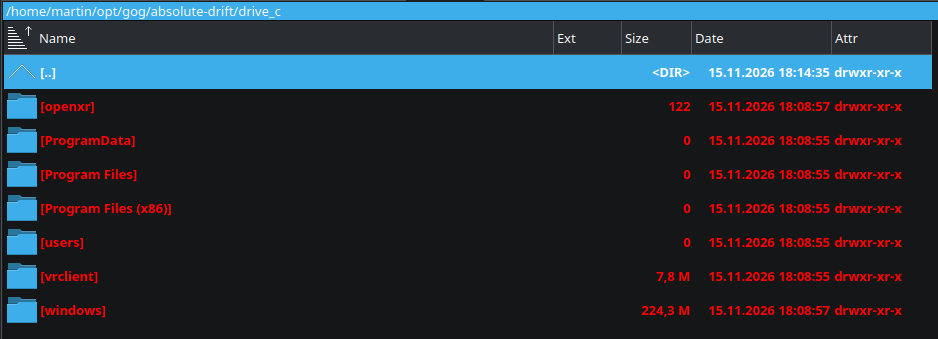
Hello, I’m running Lutris on KDE Fedora 44. Since a time (can’t tell exactly when), no GOG game installs at all. The WINE prefix seems to be in place (though cut short, too), but the game installation is simply not present. The WINE prefix also seems incomplete, as the drive_c/Windows directory only has 224 MB, whereas on a successful install, it has 693 MB.
Attached screenshots show the state of WINE prefix including directory sizes (courtesy of Double Commander).
Edit: Downloading the installation file is not an issue - the download clearly works and I can see GOG’s sh script file in Lutris’ cache before I confirm the installation process.

System details:

OS: Fedora Linux 44 (KDE Plasma Desktop Edition) x86_64
Host: MS-7E49 (1.0)
Kernel: Linux 7.3.3-200.fc44.x86_64
Uptime: 1 hour, 48 mins
Packages: 12 (flatpak), 3241 (rpm)
Shell: bash 5.3.9
Display (DELL P2425): 1920x1200 in 24", 100 Hz [External]
Display (DP-3): 1920x1200, 60 Hz [External] *
Desktop Environment: KDE Plasma 6.8.2
Window Manager: KWin (Wayland)
WM Theme: Breeze
Theme: Breeze (Dark) [Qt], Breeze [GTK3]
Icons: breeze-dark [Qt], breeze-dark [GTK3/4]
Font: Noto Sans (10pt) [Qt], Noto Sans (10pt) [GTK3/4]
Cursor: breeze (24px)
Terminal: konsole 26.8.2
CPU: AMD Ryzen 7 9800X3D (16) @ 5.27 GHz
GPU: AMD Radeon RX 9070 XT [Discrete]
Memory: 7.86 GiB / 62.34 GiB (13%)
Swap: 0 B / 8.00 GiB (0%)
Disk (/): (62%) - ext4
Local IP (wlp16s0): redacted
Locale: en_US.UTF-8

Lutris debug output from start to completing installation of Absolute Drift from GOG:

WARNING: radv is not a conformant Vulkan implementation, testing use only.
INFO     2026-11-15 18:06:29,790 [application.do_command_line:468]:Starting Lutris 0.5.22
WARNING: [Loader Message] Code 0 : terminator_CreateInstance: Received return code -9 from call to vkCreateInstance in ICD /usr/lib64/dri-freeworld/libvulkan_dzn.so. Skipping this driver.
WARNING: radv is not a conformant Vulkan implementation, testing use only.
WARNING: [Loader Message] Code 0 : ICD for selected physical device does not export vkGetPhysicalDeviceDisplayPlanePropertiesKHR!
WARNING: [Loader Message] Code 0 : ICD for selected physical device does not export vkGetPhysicalDeviceDisplayPropertiesKHR!
WARNING: [Loader Message] Code 0 : terminator_CreateInstance: Received return code -9 from call to vkCreateInstance in ICD /usr/lib64/dri-freeworld/libvulkan_dzn.so. Skipping this driver.
WARNING: radv is not a conformant Vulkan implementation, testing use only.
WARNING: [Loader Message] Code 0 : ICD for selected physical device does not export vkGetPhysicalDeviceDisplayPlanePropertiesKHR!
WARNING: [Loader Message] Code 0 : ICD for selected physical device does not export vkGetPhysicalDeviceDisplayPropertiesKHR!
INFO     2026-11-15 18:06:29,843 [startup.run_all_checks:120]:"card1" is AMD Radeon RX 9070 XT (1002:7550 1043:0613 amdgpu) Driver 26.2.6
DEBUG    2026-11-15 18:06:29,872 [xrandr.get_resolutions:91]:Retrieving resolution list
DEBUG    2026-11-15 18:06:29,873 [xrandr._get_vidmodes:18]:Retrieving 63 video modes from XrandR
DEBUG    2026-11-15 18:06:29,923 [path_cache._update_missing_games:114]:Checking for missing games
DEBUG    2026-11-15 18:06:29,979 [api.check_stale_runtime_versions:52]:Modified at Ne 15. november 2026, 17:32:13, will update after Ne 15. november 2026, 23:32:13
DEBUG    2026-11-15 18:06:29,979 [lutriswindow.create_runtime_updater_cb:1460]:Runtime up to date
DEBUG    2026-11-15 18:06:38,610 [base.install:338]:Installing 1136126792 from service gog
DEBUG    2026-11-15 18:06:38,610 [http._request:119]:POST https://lutris.net/api/games/service/gog
DEBUG    2026-11-15 18:06:38,750 [api.get_game_installers:387]:Fetching installer https://lutris.net/api/installers/absolute-drift
DEBUG    2026-11-15 18:06:38,750 [http._request:119]:GET https://lutris.net/api/installers/absolute-drift
DEBUG    2026-11-15 18:07:45,390 [xrandr._get_vidmodes:18]:Retrieving 63 video modes from XrandR
DEBUG    2026-11-15 18:08:19,941 [http._request:119]:GET https://lutris.net/api/runners/wine
DEBUG    2026-11-15 18:08:20,058 [wine.get_installer_runner_version:911]:Default wine version is dw-proton
DEBUG    2026-11-15 18:08:20,069 [gog.get_extras:340]:Download extras for GOG ID 1136126792 and its DLCs
INFO     2026-11-15 18:08:20,069 [gog.get_game_details:289]:Getting game details for 1136126792
DEBUG    2026-11-15 18:08:20,069 [http._request:119]:GET https://auth.gog.com/token?client_id=46899977096215655&client_secret=9d85c43b1482497dbbce61f6e4aa173a433796eeae2ca8c5f6129f2dc4de46d9&grant_type=refresh_token&refresh_token=REDACTED
DEBUG    2026-11-15 18:08:20,270 [http._request:119]:GET https://api.gog.com/products/1136126792?expand=downloads&locale=en-US
INFO     2026-11-15 18:08:23,603 [gog.get_game_details:289]:Getting game details for 1136126792
DEBUG    2026-11-15 18:08:23,606 [http._request:119]:GET https://api.gog.com/products/1136126792?expand=downloads&locale=en-US
INFO     2026-11-15 18:08:23,672 [installer.prepare_game_files:185]:Getting files for setup
INFO     2026-11-15 18:08:23,672 [gog.get_game_details:289]:Getting game details for 1136126792
DEBUG    2026-11-15 18:08:23,675 [http._request:119]:GET https://api.gog.com/products/1136126792?expand=downloads&locale=en-US
INFO     2026-11-15 18:08:23,758 [gog.get_download_info:296]:Getting download info for https://api.gog.com/products/1136126792/downlink/installer/en3installer0
DEBUG    2026-11-15 18:08:23,761 [http._request:119]:GET https://api.gog.com/products/1136126792/downlink/installer/en3installer0
DEBUG    2026-11-15 18:08:24,107 [installerwindow.on_files_prepared:669]:Game files prepared.
DEBUG    2026-11-15 18:08:24,109 [installerwindow.present_installer_files_page:684]:Presenting installer files page
DEBUG    2026-11-15 18:08:49,579 [downloader.start:70]:⬇ https://gog-cdn-fastly.gog.com/token=nva=1794848903~dirs=6~token=07ecceece720ba540685c/secure/linux_offlines/1136126792/1136126792/56631976931382031/4933/absolute_drift_5f6049d_65600.sh
DEBUG    2026-11-15 18:08:52,550 [downloader.on_download_completed:178]:Finished downloading https://gog-cdn-fastly.gog.com/token=nva=1794848903~dirs=6~token=07ecceece720ba540685c/secure/linux_offlines/1136126792/1136126792/56631976931382031/4933/absolute_drift_5f6049d_65600.sh
INFO     2026-11-15 18:08:52,579 [file_box.on_download_complete:232]:Download completed
DEBUG    2026-11-15 18:08:52,579 [files_box.on_file_available:108]:setup is available
INFO     2026-11-15 18:08:52,579 [files_box.on_file_available:114]:All files available
INFO     2026-11-15 18:08:52,579 [installerwindow.on_files_available:714]:All files are available, continuing install
INFO     2026-11-15 18:08:52,579 [installerwindow.launch_installer_commands:722]:Launching installer commands
DEBUG    2026-11-15 18:08:52,580 [interpreter.create_game_folder:227]:Creating destination path /home/martin/opt/gog/absolute-drift
DEBUG    2026-11-15 18:08:52,580 [interpreter._iter_commands:321]:Installer command: {'task': {'name': 'create_prefix', 'prefix': '$GAMEDIR'}}
INFO     2026-11-15 18:08:52,586 [wine.create_prefix:109]:Creating a win64 prefix in /home/martin/opt/gog/absolute-drift
INFO     2026-11-15 18:08:52,586 [wine.create_prefix:121]:Winepath: /home/martin/.local/share/lutris/runtime/umu/umu-run
lutris-wrapper: /home/martin/.local/share/lutris/runtime/umu/umu-run
Started initial process 38067 from /home/martin/.local/share/lutris/runtime/umu/umu-run createprefix
Start monitoring process.
INFO: umu-launcher version 1.4.4 (3.14.10 (main, Oct 26 2026, 00:00:00) [GCC 16.2.1 20260819 (Red Hat 16.2.1-2)])
INFO: GE-Proton is up to date
INFO: steamrt4 is up to date
INFO: Running 'GE-Proton11-12-x86_64' using runtime 'steamrt4'
INFO: Running 'steamrt4' using runtime 'host'
ProtonFixes[38166] WARN: Skipping fix execution. Execution conditions are not satisfied.
Proton: Upgrading prefix from None to 11.0-100 with GE-Proton11-12 (/home/martin/opt/gog/absolute-drift/)
Proton: Error: unable to use parent for game drive, path 
ProtonFixes[38166] WARN: Skipping upscaler setup. Execution conditions are not satisfied.
ProtonFixes[38166] WARN: Skipping fix execution. Execution conditions are not satisfied.
Proton: Error: unable to use parent for game drive, path 
Proton: Executable is inside wine prefix, launching normally.
fsync: up and running.
INFO     2026-11-15 18:08:56,088 [wine.create_prefix:184]:win64 Prefix created in /home/martin/opt/gog/absolute-drift
DEBUG    2026-11-15 18:08:56,090 [interpreter._iter_commands:321]:Installer command: {'task': {'args': '/NOCANCEL /SP- /SUPPRESSMSGBOXES', 'executable': 'setup', 'name': 'wineexec', 'prefix': '$GAMEDIR'}}
lutris-wrapper: /home/martin/.local/share/lutris/runtime/umu/umu-run
Started initial process 38223 from /home/martin/.local/share/lutris/runtime/umu/umu-run /home/martin/.cache/lutris/installer/absolute-drift/gog/absolute_drift_5f6049d_65600.sh /NOCANCEL /SP- /SUPPRESSMSGBOXES
Start monitoring process.
Application could not be started, or no application associated with the specified file.
ShellExecuteEx failed: File not found.

[umu.__main__:78] DEBUG: SHELL=/bin/bash
[umu.__main__:78] DEBUG: IMSETTINGS_INTEGRATE_DESKTOP=yes
[umu.__main__:78] DEBUG: SESSION_MANAGER=local/unix:@/tmp/.ICE-unix/1548,unix/unix:/tmp/.ICE-unix/1548
[umu.__main__:78] DEBUG: WINDOWID=94568843000048
[umu.__main__:78] DEBUG: COLORTERM=truecolor
[umu.__main__:78] DEBUG: XDG_CONFIG_DIRS=/home/martin/.config/kdedefaults:/etc/xdg:/usr/share/kde-settings/kde-profile/default/xdg
[umu.__main__:78] DEBUG: XDG_SESSION_PATH=/org/freedesktop/DisplayManager/Session0
[umu.__main__:78] DEBUG: HISTCONTROL=ignoredups
[umu.__main__:78] DEBUG: XDG_MENU_PREFIX=plasma-
[umu.__main__:78] DEBUG: HOSTNAME=gamer
[umu.__main__:78] DEBUG: HISTSIZE=1000
[umu.__main__:78] DEBUG: ICEAUTHORITY=/run/user/1000/iceauth_jkfjbv
[umu.__main__:78] DEBUG: LANGUAGE=en_US
[umu.__main__:78] DEBUG: LC_ADDRESS=sk_SK.UTF-8
[umu.__main__:78] DEBUG: LC_NAME=sk_SK.UTF-8
[umu.__main__:78] DEBUG: SSH_AUTH_SOCK=/run/user/1000/ssh-agent.socket
[umu.__main__:78] DEBUG: SHELL_SESSION_ID=5e42f3b8c9334362bb67bbfe5a245aba
[umu.__main__:78] DEBUG: MEMORY_PRESSURE_WRITE=c29tZSAyMDAwMDAgMjAwMDAwMAA=
[umu.__main__:78] DEBUG: DESKTOP_SESSION=plasma
[umu.__main__:78] DEBUG: LC_MONETARY=sk_SK.UTF-8
[umu.__main__:78] DEBUG: GDK_CORE_DEVICE_EVENTS=1
[umu.__main__:78] DEBUG: GPG_TTY=/dev/pts/3
[umu.__main__:78] DEBUG: EDITOR=/usr/bin/nano
[umu.__main__:78] DEBUG: XDG_SEAT=seat0
[umu.__main__:78] DEBUG: PWD=/home/martin
[umu.__main__:78] DEBUG: XDG_SESSION_DESKTOP=KDE
[umu.__main__:78] DEBUG: LOGNAME=martin
[umu.__main__:78] DEBUG: XDG_SESSION_TYPE=wayland
[umu.__main__:78] DEBUG: SYSTEMD_EXEC_PID=1572
[umu.__main__:78] DEBUG: XAUTHORITY=/run/user/1000/xauth_pTauZz
[umu.__main__:78] DEBUG: SDL_VIDEO_MINIMIZE_ON_FOCUS_LOSS=0
[umu.__main__:78] DEBUG: XKB_DEFAULT_MODEL=pc105
[umu.__main__:78] DEBUG: GTK2_RC_FILES=/home/martin/.gtkrc-2.0-kde4
[umu.__main__:78] DEBUG: HOME=/home/martin
[umu.__main__:78] DEBUG: SSH_ASKPASS=/usr/bin/ksshaskpass
[umu.__main__:78] DEBUG: LC_PAPER=sk_SK.UTF-8
[umu.__main__:78] DEBUG: LANG=en_US.UTF-8
[umu.__main__:78] DEBUG: _JAVA_AWT_WM_NONREPARENTING=1
[umu.__main__:78] DEBUG: LS_COLORS=rs=0:di=01;34:ln=01;36:mh=00:pi=40;33:so=01;35:do=01;35:bd=40;33;01:cd=40;33;01:or=40;31;01:mi=01;37;41:su=37;41:sg=30;43:ca=00:tw=30;42:ow=34;42:st=37;44:ex=01;32:*.7z=01;31:*.ace=01;31:*.alz=01;31:*.apk=01;31:*.arc=01;31:*.arj=01;31:*.bz=01;31:*.bz2=01;31:*.cab=01;31:*.cpio=01;31:*.crate=01;31:*.deb=01;31:*.drpm=01;31:*.dwm=01;31:*.dz=01;31:*.ear=01;31:*.egg=01;31:*.esd=01;31:*.gz=01;31:*.jar=01;31:*.lha=01;31:*.lrz=01;31:*.lz=01;31:*.lz4=01;31:*.lzh=01;31:*.lzma=01;31:*.lzo=01;31:*.pyz=01;31:*.rar=01;31:*.rpm=01;31:*.rz=01;31:*.sar=01;31:*.swm=01;31:*.t7z=01;31:*.tar=01;31:*.taz=01;31:*.tbz=01;31:*.tbz2=01;31:*.tgz=01;31:*.tlz=01;31:*.txz=01;31:*.tz=01;31:*.tzo=01;31:*.tzst=01;31:*.udeb=01;31:*.war=01;31:*.whl=01;31:*.wim=01;31:*.xz=01;31:*.z=01;31:*.zip=01;31:*.zoo=01;31:*.zst=01;31:*.avif=01;35:*.jpg=01;35:*.jpeg=01;35:*.jxl=01;35:*.mjpg=01;35:*.mjpeg=01;35:*.gif=01;35:*.bmp=01;35:*.pbm=01;35:*.pgm=01;35:*.ppm=01;35:*.tga=01;35:*.xbm=01;35:*.xpm=01;35:*.tif=01;35:*.tiff=01;35:*.png=01;35:*.svg=01;35:*.svgz=01;35:*.mng=01;35:*.pcx=01;35:*.mov=01;35:*.mpg=01;35:*.mpeg=01;35:*.m2v=01;35:*.mkv=01;35:*.webm=01;35:*.webp=01;35:*.ogm=01;35:*.mp4=01;35:*.m4v=01;35:*.mp4v=01;35:*.vob=01;35:*.qt=01;35:*.nuv=01;35:*.wmv=01;35:*.asf=01;35:*.rm=01;35:*.rmvb=01;35:*.flc=01;35:*.avi=01;35:*.fli=01;35:*.flv=01;35:*.gl=01;35:*.dl=01;35:*.xcf=01;35:*.xwd=01;35:*.yuv=01;35:*.cgm=01;35:*.emf=01;35:*.ogv=01;35:*.ogx=01;35:*.aac=01;36:*.au=01;36:*.flac=01;36:*.m4a=01;36:*.mid=01;36:*.midi=01;36:*.mka=01;36:*.mp3=01;36:*.mpc=01;36:*.ogg=01;36:*.ra=01;36:*.wav=01;36:*.oga=01;36:*.opus=01;36:*.spx=01;36:*.xspf=01;36:*~=00;90:*#=00;90:*.bak=00;90:*.crdownload=00;90:*.dpkg-dist=00;90:*.dpkg-new=00;90:*.dpkg-old=00;90:*.dpkg-tmp=00;90:*.old=00;90:*.orig=00;90:*.part=00;90:*.rej=00;90:*.rpmnew=00;90:*.rpmorig=00;90:*.rpmsave=00;90:*.swp=00;90:*.tmp=00;90:*.ucf-dist=00;90:*.ucf-new=00;90:*.ucf-old=00;90:
[umu.__main__:78] DEBUG: XDG_CURRENT_DESKTOP=KDE
[umu.__main__:78] DEBUG: KONSOLE_DBUS_SERVICE=:1.289
[umu.__main__:78] DEBUG: MEMORY_PRESSURE_WATCH=/sys/fs/cgroup/user.slice/user-1000.slice/user@1000.service/session.slice/plasma-plasmashell.service/memory.pressure
[umu.__main__:78] DEBUG: WAYLAND_DISPLAY=wayland-1
[umu.__main__:78] DEBUG: KONSOLE_DBUS_SESSION=/Sessions/1
[umu.__main__:78] DEBUG: PROFILEHOME=
[umu.__main__:78] DEBUG: XDG_SEAT_PATH=/org/freedesktop/DisplayManager/Seat0
[umu.__main__:78] DEBUG: INVOCATION_ID=6851dd01ccd04916b72f5f3af5f04470
[umu.__main__:78] DEBUG: KONSOLE_VERSION=260802
[umu.__main__:78] DEBUG: MANAGERPID=1342
[umu.__main__:78] DEBUG: IMSETTINGS_MODULE=none
[umu.__main__:78] DEBUG: STEAM_FRAME_FORCE_CLOSE=1
[umu.__main__:78] DEBUG: KDE_SESSION_UID=1000
[umu.__main__:78] DEBUG: MOZ_GMP_PATH=/usr/lib64/mozilla/plugins/gmp-gmpopenh264/system-installed
[umu.__main__:78] DEBUG: XKB_DEFAULT_LAYOUT=us,sk
[umu.__main__:78] DEBUG: XDG_SESSION_CLASS=user
[umu.__main__:78] DEBUG: TERM=xterm-256color
[umu.__main__:78] DEBUG: KONSOLE_DBUS_ACTIVATION_COOKIE=l+KKB+zOV02Mqejm6wLHQU55A4HpAuj30XzQzo3FtOU=
[umu.__main__:78] DEBUG: LESSOPEN=||/usr/bin/lesspipe.sh %s
[umu.__main__:78] DEBUG: USER=martin
[umu.__main__:78] DEBUG: COLORFGBG=15;0
[umu.__main__:78] DEBUG: QT_WAYLAND_RECONNECT=1
[umu.__main__:78] DEBUG: KDE_SESSION_VERSION=6
[umu.__main__:78] DEBUG: DISPLAY=:0
[umu.__main__:78] DEBUG: SHLVL=1
[umu.__main__:78] DEBUG: LC_TELEPHONE=sk_SK.UTF-8
[umu.__main__:78] DEBUG: LC_MEASUREMENT=sk_SK.UTF-8
[umu.__main__:78] DEBUG: XDG_VTNR=1
[umu.__main__:78] DEBUG: XDG_SESSION_ID=1
[umu.__main__:78] DEBUG: MANAGERPIDFDID=41076
[umu.__main__:78] DEBUG: XDG_RUNTIME_DIR=/run/user/1000
[umu.__main__:78] DEBUG: DEBUGINFOD_URLS=ima:enforcing https://debuginfod.fedoraproject.org/ ima:ignore 
[umu.__main__:78] DEBUG: LC_TIME=sk_SK.UTF-8
[umu.__main__:78] DEBUG: DOCKER_HOST=unix:///run/user/1000/podman/podman.sock
[umu.__main__:78] DEBUG: DEBUGINFOD_IMA_CERT_PATH=/etc/keys/ima:
[umu.__main__:78] DEBUG: KDEDIRS=/usr
[umu.__main__:78] DEBUG: XKB_DEFAULT_VARIANT=,
[umu.__main__:78] DEBUG: JOURNAL_STREAM=12:27743
[umu.__main__:78] DEBUG: XDG_DATA_DIRS=/home/martin/.local/share/flatpak/exports/share:/var/lib/flatpak/exports/share:/usr/local/share:/usr/share
[umu.__main__:78] DEBUG: KDE_FULL_SESSION=true
[umu.__main__:78] DEBUG: PATH=/home/martin/.local/bin:/home/martin/bin:/usr/local/bin:/usr/bin:/usr/local/sbin:/usr/sbin
[umu.__main__:78] DEBUG: DBUS_SESSION_BUS_ADDRESS=unix:path=/run/user/1000/bus
[umu.__main__:78] DEBUG: KDE_APPLICATIONS_AS_SCOPE=1
[umu.__main__:78] DEBUG: MAIL=/var/spool/mail/martin
[umu.__main__:78] DEBUG: XKB_DEFAULT_OPTIONS=grp:alt_shift_toggle
[umu.__main__:78] DEBUG: FLATPAK_TTY_PROGRESS=1
[umu.__main__:78] DEBUG: LC_NUMERIC=sk_SK.UTF-8
[umu.__main__:78] DEBUG: KONSOLE_DBUS_WINDOW=/Windows/1
[umu.__main__:78] DEBUG: _=/usr/bin/lutris
[umu.__main__:78] DEBUG: WEBKIT_DISABLE_DMABUF_RENDERER=1
[umu.__main__:78] DEBUG: PROTOCOL_BUFFERS_PYTHON_IMPLEMENTATION=python
[umu.__main__:78] DEBUG: __GL_SHADER_DISK_CACHE=1
[umu.__main__:78] DEBUG: __GL_SHADER_DISK_CACHE_PATH=/home/martin/.cache/lutris/shaders/wine
[umu.__main__:78] DEBUG: LD_LIBRARY_PATH=/lib64:/lib:/usr/lib64/dri-freeworld:/usr/lib/dri-freeworld:/usr/lib64/pipewire-0.3/jack:/usr/lib64/iscsi:/usr/lib64/ffmpeg:/usr/lib:/usr/lib64:/home/martin/.local/share/lutris/runtime/Ubuntu-18.04-i686:/home/martin/.local/share/lutris/runtime/steam/i386/lib/i386-linux-gnu:/home/martin/.local/share/lutris/runtime/steam/i386/lib:/home/martin/.local/share/lutris/runtime/steam/i386/usr/lib/i386-linux-gnu:/home/martin/.local/share/lutris/runtime/steam/i386/usr/lib:/home/martin/.local/share/lutris/runtime/Ubuntu-18.04-x86_64:/home/martin/.local/share/lutris/runtime/steam/amd64/lib/x86_64-linux-gnu:/home/martin/.local/share/lutris/runtime/steam/amd64/lib:/home/martin/.local/share/lutris/runtime/steam/amd64/usr/lib/x86_64-linux-gnu:/home/martin/.local/share/lutris/runtime/steam/amd64/usr/lib
[umu.__main__:78] DEBUG: WINEDEBUG=-all
[umu.__main__:78] DEBUG: DXVK_LOG_LEVEL=error
[umu.__main__:78] DEBUG: UMU_LOG=1
[umu.__main__:78] DEBUG: WINEARCH=win64
[umu.__main__:78] DEBUG: PROTONPATH=GE-Proton
[umu.__main__:78] DEBUG: WINE=/home/martin/.local/share/lutris/runtime/umu/umu-run
[umu.__main__:78] DEBUG: WINEPREFIX=/home/martin/opt/gog/absolute-drift
[umu.__main__:78] DEBUG: WINEESYNC=1
[umu.__main__:78] DEBUG: WINEFSYNC=1
[umu.__main__:78] DEBUG: WINE_FULLSCREEN_FSR=1
[umu.__main__:78] DEBUG: DXVK_NVAPIHACK=0
[umu.__main__:78] DEBUG: DXVK_ENABLE_NVAPI=1
[umu.__main__:78] DEBUG: PROTON_BATTLEYE_RUNTIME=/home/martin/.local/share/lutris/runtime/battleye_runtime
[umu.__main__:78] DEBUG: PROTON_EAC_RUNTIME=/home/martin/.local/share/lutris/runtime/eac_runtime
[umu.__main__:78] DEBUG: PROTON_DXVK_D3D8=1
[umu.__main__:78] DEBUG: WINEDLLOVERRIDES=d3d10core,d3d11,d3d12,d3d12core,d3d8,d3d9,d3dcompiler_33,d3dcompiler_34,d3dcompiler_35,d3dcompiler_36,d3dcompiler_37,d3dcompiler_38,d3dcompiler_39,d3dcompiler_40,d3dcompiler_41,d3dcompiler_42,d3dcompiler_43,d3dcompiler_46,d3dcompiler_47,d3dx10,d3dx10_33,d3dx10_34,d3dx10_35,d3dx10_36,d3dx10_37,d3dx10_38,d3dx10_39,d3dx10_40,d3dx10_41,d3dx10_42,d3dx10_43,d3dx11_42,d3dx11_43,d3dx9_24,d3dx9_25,d3dx9_26,d3dx9_27,d3dx9_28,d3dx9_29,d3dx9_30,d3dx9_31,d3dx9_32,d3dx9_33,d3dx9_34,d3dx9_35,d3dx9_36,d3dx9_37,d3dx9_38,d3dx9_39,d3dx9_40,d3dx9_41,d3dx9_42,d3dx9_43,dxgi,nvapi,nvapi64,nvofapi64=n;winemenubuilder=
[umu.__main__:78] DEBUG: LUTRIS_GAME_UUID=e270dd0d-a71e-4c6a-9e5e-820798d4cd27
[umu.umu_run:864] INFO: umu-launcher version 1.4.4 (3.14.10 (main, Oct 26 2026, 00:00:00) [GCC 16.2.1 20260819 (Red Hat 16.2.1-2)])
[umu.umu_run:137] INFO: No GAMEID set, using umu-default
[umu.umu_proton:90] DEBUG: Sending request to 'api.github.com'...
Monitored process exited.
Initial process has exited (return code: 256)
All processes have quit
Exit with return code 256
DEBUG    2026-11-15 18:08:56,456 [monitored_command.on_stop:232]:Process 38065 has terminated with code 256
[umu.umu_proton:658] DEBUG: PROTONPATH not *-Latest, skipping
[umu.umu_proton:541] INFO: GE-Proton is up to date
[umu.umu_run:791] DEBUG: PROTONPATH set, resolving its required runtime
[umu.umu_run:969] DEBUG: Connecting to '1.1.1.1'...
[umu.umu_runtime:266] DEBUG: Local: /home/martin/.local/share/umu/steamrt4
[umu.umu_runtime:279] DEBUG: Sending request to 'https://repo.steampowered.com/steamrt4/images/latest-public-beta.txt' for 'latest-public-beta.txt'...
[umu.umu_runtime:322] DEBUG: Existing install detected
[umu.umu_runtime:323] DEBUG: Using container runtime 'steamrt4' aka 'steamrt4'
[umu.umu_runtime:324] DEBUG: Checking updates for 'steamrt4'...
[umu.umu_runtime:471] DEBUG: Acquiring file lock '/home/martin/.local/share/umu/umu.lock'...
[umu.umu_runtime:473] DEBUG: Acquired file lock '/home/martin/.local/share/umu/umu.lock'
[umu.umu_runtime:481] DEBUG: Released file lock '/home/martin/.local/share/umu/umu.lock'
[umu.umu_runtime:378] INFO: steamrt4 is up to date
[umu.umu_run:1036] DEBUG: WINEPREFIX=/home/martin/opt/gog/absolute-drift
[umu.umu_run:1036] DEBUG: GAMEID=umu-default
[umu.umu_run:1036] DEBUG: PROTON_CRASH_REPORT_DIR=/tmp/umu_crashreports
[umu.umu_run:1036] DEBUG: PROTONPATH=/home/martin/.local/share/Steam/compatibilitytools.d/GE-Proton11-12-x86_64
[umu.umu_run:1036] DEBUG: STEAM_COMPAT_APP_ID=c21336dce592929688cf508b1039ca65
[umu.umu_run:1036] DEBUG: STEAM_COMPAT_TOOL_PATHS=/home/martin/.local/share/Steam/compatibilitytools.d/GE-Proton11-12-x86_64:/home/martin/.local/share/umu/steamrt4
[umu.umu_run:1036] DEBUG: STEAM_COMPAT_LIBRARY_PATHS=
[umu.umu_run:1036] DEBUG: STEAM_COMPAT_MOUNTS=/home/martin/.local/share/Steam/compatibilitytools.d/GE-Proton11-12-x86_64:/home/martin/.local/share/umu/steamrt4
[umu.umu_run:1036] DEBUG: STEAM_COMPAT_INSTALL_PATH=/home/martin/.cache/lutris/installer/absolute-drift/gog
[umu.umu_run:1036] DEBUG: STEAM_COMPAT_CLIENT_INSTALL_PATH=
[umu.umu_run:1036] DEBUG: STEAM_COMPAT_DATA_PATH=/home/martin/opt/gog/absolute-drift
[umu.umu_run:1036] DEBUG: STEAM_COMPAT_SHADER_PATH=/home/martin/opt/gog/absolute-drift/shadercache
[umu.umu_run:1036] DEBUG: STEAM_COMPAT_LAUNCHER_SERVICE=
[umu.umu_run:1036] DEBUG: FONTCONFIG_PATH=
[umu.umu_run:1036] DEBUG: EXE=/home/martin/.cache/lutris/installer/absolute-drift/gog/absolute_drift_5f6049d_65600.sh
[umu.umu_run:1036] DEBUG: SteamAppId=default
[umu.umu_run:1036] DEBUG: SteamGameId=default
[umu.umu_run:1036] DEBUG: STEAM_RUNTIME_LIBRARY_PATH=/usr/lib64:/home/martin/.local/share/lutris/runtime/steam/i386/lib/i386-linux-gnu:/home/martin/.local/share/lutris/runtime/Ubuntu-18.04-x86_64:/usr/lib64/dri-freeworld:/home/martin/.local/share/lutris/runtime/Ubuntu-18.04-i686:/home/martin/.local/share/lutris/runtime/steam/i386/usr/lib/i386-linux-gnu:/home/martin/.local/share/lutris/runtime/steam/amd64/lib/x86_64-linux-gnu:/home/martin/.local/share/lutris/runtime/steam/amd64/lib:/usr/lib64/ffmpeg:/lib:/usr/lib/dri-freeworld:/usr/lib:/home/martin/.local/share/lutris/runtime/steam/amd64/usr/lib:/lib64:/usr/lib64/iscsi:/usr/lib64/pipewire-0.3/jack:/home/martin/.local/share/lutris/runtime/steam/i386/usr/lib:/home/martin/.local/share/lutris/runtime/steam/amd64/usr/lib/x86_64-linux-gnu:/home/martin/.cache/lutris/installer/absolute-drift/gog:/home/martin/.local/share/lutris/runtime/steam/i386/lib
[umu.umu_run:1036] DEBUG: STORE=
[umu.umu_run:1036] DEBUG: PROTON_VERB=waitforexitandrun
[umu.umu_run:1036] DEBUG: UMU_ID=umu-default
[umu.umu_run:1036] DEBUG: UMU_ZENITY=
[umu.umu_run:1036] DEBUG: UMU_NO_RUNTIME=
[umu.umu_run:1036] DEBUG: UMU_RUNTIME_UPDATE=
[umu.umu_run:1036] DEBUG: UMU_NO_PROTON=
[umu.umu_run:1036] DEBUG: UMU_CONTAINER_NSENTER=
[umu.umu_run:1036] DEBUG: RUNTIMEPATH=/home/martin/.local/share/umu/steamrt4
[umu.umu_run:1036] DEBUG: UMU_STEAM_GAME_ID=
[umu.umu_run:1036] DEBUG: UMU_INVOCATION_ID=9731ff89d62afbf53d792ffcc55b7f96
[umu.umu_runtime:657] INFO: Running 'GE-Proton11-12-x86_64' using runtime 'steamrt4'
[umu.umu_runtime:657] INFO: Running 'steamrt4' using runtime 'host'
[umu.umu_run:1047] DEBUG: ('/home/martin/.local/share/umu/steamrt4/umu', '--verb=waitforexitandrun', '--', '/home/martin/.local/share/umu/umu-shim', '/home/martin/.local/share/Steam/compatibilitytools.d/GE-Proton11-12-x86_64/proton', 'waitforexitandrun', '/home/martin/.cache/lutris/installer/absolute-drift/gog/absolute_drift_5f6049d_65600.sh', '/NOCANCEL', '/SP-', '/SUPPRESSMSGBOXES')
[umu.umu_run:736] DEBUG: prctl exited with status: 0
ProtonFixes[38332] INFO: Running protonfixes on "GE-Proton11-12", build at 2026-11-03 06:26:05+00:00.
ProtonFixes[38332] INFO: Running checks
ProtonFixes[38332] INFO: All checks successful
ProtonFixes[38332] WARN: Game title not found in CSV
ProtonFixes[38332] INFO: Non-steam game UNKNOWN (umu-default)
ProtonFixes[38332] INFO: No store specified, using UMU database
ProtonFixes[38332] INFO: Using early stage global defaults for UNKNOWN (umu-default)
ProtonFixes[38332] INFO: Non-steam game UNKNOWN (umu-default)
ProtonFixes[38332] INFO: No store specified, using UMU database
ProtonFixes[38332] INFO: No early stage global protonfix found for UNKNOWN (umu-default)
Proton: Error: unable to use parent for game drive, path 
ProtonFixes[38332] INFO: Running protonfixes on "GE-Proton11-12", build at 2026-11-03 06:26:05+00:00.
ProtonFixes[38332] INFO: Running checks
ProtonFixes[38332] INFO: All checks successful
ProtonFixes[38332] INFO: Non-steam game UNKNOWN (umu-default)
ProtonFixes[38332] INFO: No store specified, using UMU database
ProtonFixes[38332] INFO: Using main stage global defaults for UNKNOWN (umu-default)
ProtonFixes[38332] INFO: Non-steam game UNKNOWN (umu-default)
ProtonFixes[38332] INFO: No store specified, using UMU database
ProtonFixes[38332] INFO: No main stage global protonfix found for UNKNOWN (umu-default)
Proton: /home/martin/.cache/lutris/installer/absolute-drift/gog/absolute_drift_5f6049d_65600.sh
Proton: Executable is a unix path, launching with 'umu.exe'.
fsync: up and running.
WARNING: radv is not a conformant Vulkan implementation, testing use only.
[umu.umu_run:744] DEBUG: Child 38236 exited with wait status: 0
Monitored process exited.
Initial process has exited (return code: 0)
All processes have quit
Exit with return code 0
DEBUG    2026-11-15 18:08:57,975 [monitored_command.on_stop:232]:Process 38198 has terminated with code 0
DEBUG    2026-11-15 18:08:58,121 [commands._monitor_task:441]:Return code: 0
DEBUG    2026-11-15 18:08:58,122 [interpreter._iter_commands:339]:Commands 2 out of 2 completed
DEBUG    2026-11-15 18:08:58,125 [config.write_game_config:23]:Writing game config to absolute-drift-gog-1794762538
DEBUG    2026-11-15 18:08:58,135 [http._request:119]:GET https://lutris.net/api/games/absolute-drift
DEBUG    2026-11-15 18:08:58,136 [xdgshortcuts.create_launcher:97]:Creating Desktop icon in /home/martin/Desktop/net.lutris.absolute-drift-16.desktop
DEBUG    2026-11-15 18:08:58,136 [xdgshortcuts.create_launcher:104]:Creating menu launcher in /home/martin/.local/share/applications/net.lutris.absolute-drift-16.desktop
ERROR    2026-11-15 18:08:58,138 [jobs.target:64]:Error while completing task <bound method InstallerWindow.create_shortcut of <installerwindow.InstallerWindow object at 0x7fca2bd8d0c0 (lutris+gui+installerwindow+InstallerWindow at 0x562cbb598580)>>: <class 'FileNotFoundError'> [Errno 2] No such file or directory: '/home/martin/.cache/lutris/net.lutris.absolute-drift-16.desktop'
  File "/usr/lib/python3.14/site-packages/lutris/util/jobs.py", line 62, in target
    result = self.function(*a, **kw)
  File "/usr/lib/python3.14/site-packages/lutris/gui/installerwindow.py", line 1031, in create_shortcut
    xdgshortcuts.create_launcher(game_slug, game_id, game_name, menu=True)
    ~~~~~~~~~~~~~~~~~~~~~~~~~~~~^^^^^^^^^^^^^^^^^^^^^^^^^^^^^^^^^^^^^^^^^^
  File "/usr/lib/python3.14/site-packages/lutris/util/xdgshortcuts.py", line 105, in create_launcher
    shutil.copy(tmp_launcher_path, launcher_path)
    ~~~~~~~~~~~^^^^^^^^^^^^^^^^^^^^^^^^^^^^^^^^^^
  File "/usr/lib64/python3.14/shutil.py", line 490, in copy
    copymode(src, dst, follow_symlinks=follow_symlinks)
    ~~~~~~~~^^^^^^^^^^^^^^^^^^^^^^^^^^^^^^^^^^^^^^^^^^^
  File "/usr/lib64/python3.14/shutil.py", line 378, in copymode
    st = stat_func(src)
  File "/usr/lib64/python3.14/shutil.py", line 278, in _stat
    return fn.stat() if isinstance(fn, os.DirEntry) else os.stat(fn)
                                                         ~~~~~~~^^^^
DEBUG    2026-11-15 18:08:58,139 [game.save:470]:Saving Absolute Drift (wine) with config ID absolute-drift-gog-1794762538
DEBUG    2026-11-15 18:08:58,139 [config.save:255]:Saving LutrisConfig(level=game, game_config_id=absolute-drift-gog-1794762538, runner=wine) config to /home/martin/.local/share/lutris/games/absolute-drift-gog-1794762538.yml
DEBUG    2026-11-15 18:08:58,157 [path_cache.add_to_path_cache:47]:Adding Absolute Drift (wine) to path cache
DEBUG    2026-11-15 18:14:16,254 [system.delete_folder:376]:Deleting folder /home/martin/.cache/lutris/installer/absolute-drift
INFO     2026-11-15 18:14:19,403 [application.do_shutdown:1076]:Shutting down Lutris

I see several lines of:
Proton: Error: unable to use parent for game drive, path
It appears that it’s not being passed anything for the path to the game drive (since there’s just one space after “path”).
The only thing I can think of trying is to delete the prefix (at /home/yourusername/opt/gog/absolute-drift) and try again.

Doesn’t work, I tried several times.
My assumption is that the message about “unusable game drive, path” is merely a consequence to the deeper cause of the issue. Which I think is either a failed wineboot (or its equivalent that Lutris uses) or a race condition which tries to access the WINE prefix before it’s actually created.
But I’m unable to debug further to support this theory.

Yeah, I can’t really help much more either. I hope someone else who maybe has installed the game successfully can chime in

Most importantly, this entry is not about this specific game. All of GOG games perform the same for me. This is just an example.
For now, I just initialize the WINE prefix manually and install the game manually. But I would really like to be able to use Lutris as an all-in-one solution which allows me to use other (e. g. Proton-based) runners without hassle.

Have you tried using a different version of wine/proton?

No. How would I go about it?

Go to the three horizontal lines up top → preferences → runners, scroll down to wine, and press the little icon next to it (circled in red in the screenshot). Then install another version.

(You might not see many. Some were removed. You can add custom ones with a tool like Protonup-QT (website / github) (available as flatpak or as appimage))

After adding a wine version, you need to select it to be used as well. Either, in the same place as the screenshot, press the tool icon and select your preferred default wine version in the drop-down menu “wine version”. Or go to the game, and select configure → runner options and select it there specifically for that game. The first might only apply to new games, I’m not entirely certain (and not willing to risk breaking my games to test).

image

I gave it a try. Here’s what I did:

  • Installed wine-lutris-4.21. This is irrelevant, since I didn’t really use it further. Mentioning it just for completeness sake.
  • Set the default Wine version in Lutris to the already installed wine-staging-11.2-x86_64. Can’t really tell what it was set to originally - some version of GE Proton.
  • With the new default, I tried to install the smallest available game - the Absolute Drift. Failed again, this time with more information. See below. The log tail says that the installation has been canceled - that was the only option in the GUI, since the installation failed beforehand. The cancellation is not the cause of the failure!
  • With the new default (still in place, I checked), I tried a different game - Aven Colony. Installed fine, was able to run it. There are some artifacts with video playback, but generally this is a success.

If anyone can make sense of why the Absolute Drift failed with the new Wine default, I would appreciate it. From a quick look, the Aven Colony Wine environment was 64 bit, so maybe that’s the issue?

Anyway, thanks for the hints so far, it got me somewhere. I will keep playing around with the runners. Thanks a lot!

Console output of the failed Absolute Drift:

WARNING: radv is not a conformant Vulkan implementation, testing use only.
INFO     2026-11-17 18:29:52,428 [application.do_command_line:468]:Starting Lutris 0.5.22
WARNING: [Loader Message] Code 0 : terminator_CreateInstance: Received return code -9 from call to vkCreateInstance in ICD /usr/lib64/dri-freeworld/libvulkan_dzn.so. Skipping this driver.
WARNING: radv is not a conformant Vulkan implementation, testing use only.
WARNING: [Loader Message] Code 0 : ICD for selected physical device does not export vkGetPhysicalDeviceDisplayPlanePropertiesKHR!
WARNING: [Loader Message] Code 0 : ICD for selected physical device does not export vkGetPhysicalDeviceDisplayPropertiesKHR!
WARNING: [Loader Message] Code 0 : terminator_CreateInstance: Received return code -9 from call to vkCreateInstance in ICD /usr/lib64/dri-freeworld/libvulkan_dzn.so. Skipping this driver.
WARNING: radv is not a conformant Vulkan implementation, testing use only.
WARNING: [Loader Message] Code 0 : ICD for selected physical device does not export vkGetPhysicalDeviceDisplayPlanePropertiesKHR!
WARNING: [Loader Message] Code 0 : ICD for selected physical device does not export vkGetPhysicalDeviceDisplayPropertiesKHR!
INFO     2026-11-17 18:29:52,482 [startup.run_all_checks:120]:"card1" is AMD Radeon RX 9070 XT (1002:7550 1043:0613 amdgpu) Driver 26.2.6
DEBUG    2026-11-17 18:29:52,527 [xrandr.get_resolutions:91]:Retrieving resolution list
DEBUG    2026-11-17 18:29:52,528 [xrandr._get_vidmodes:18]:Retrieving 63 video modes from XrandR
DEBUG    2026-11-17 18:29:52,580 [path_cache._update_missing_games:114]:Checking for missing games
DEBUG    2026-11-17 18:29:52,636 [api.check_stale_runtime_versions:52]:Modified at Ut 17. november 2026, 18:00:09, will update after St 18. november 2026, 00:00:09
DEBUG    2026-11-17 18:29:52,636 [lutriswindow.create_runtime_updater_cb:1460]:Runtime up to date
DEBUG    2026-11-17 18:30:11,029 [base.install:338]:Installing 1136126792 from service gog
DEBUG    2026-11-17 18:30:11,029 [http._request:119]:POST https://lutris.net/api/games/service/gog
DEBUG    2026-11-17 18:30:11,178 [api.get_game_installers:387]:Fetching installer https://lutris.net/api/installers/absolute-drift
DEBUG    2026-11-17 18:30:11,178 [http._request:119]:GET https://lutris.net/api/installers/absolute-drift
DEBUG    2026-11-17 18:30:40,433 [xrandr.get_resolutions:91]:Retrieving resolution list
DEBUG    2026-11-17 18:30:40,435 [xrandr._get_vidmodes:18]:Retrieving 63 video modes from XrandR
DEBUG    2026-11-17 18:31:43,108 [xrandr.get_resolutions:91]:Retrieving resolution list
DEBUG    2026-11-17 18:31:43,110 [xrandr._get_vidmodes:18]:Retrieving 63 video modes from XrandR
DEBUG    2026-11-17 18:31:43,111 [xrandr.get_resolutions:91]:Retrieving resolution list
DEBUG    2026-11-17 18:31:43,112 [xrandr._get_vidmodes:18]:Retrieving 63 video modes from XrandR
DEBUG    2026-11-17 18:31:47,420 [config.save:255]:Saving LutrisConfig(level=runner, game_config_id=None, runner=wine) config to /home/martin/.local/share/lutris/runners/wine.yml
DEBUG    2026-11-17 18:31:53,661 [base.install:338]:Installing 1136126792 from service gog
DEBUG    2026-11-17 18:31:53,661 [http._request:119]:POST https://lutris.net/api/games/service/gog
DEBUG    2026-11-17 18:31:54,923 [api.get_game_installers:387]:Fetching installer https://lutris.net/api/installers/absolute-drift
DEBUG    2026-11-17 18:31:54,923 [http._request:119]:GET https://lutris.net/api/installers/absolute-drift
DEBUG    2026-11-17 18:31:58,553 [xrandr._get_vidmodes:18]:Retrieving 63 video modes from XrandR
DEBUG    2026-11-17 18:32:07,574 [gog.get_extras:340]:Download extras for GOG ID 1136126792 and its DLCs
INFO     2026-11-17 18:32:07,574 [gog.get_game_details:289]:Getting game details for 1136126792
DEBUG    2026-11-17 18:32:07,576 [http._request:119]:GET https://auth.gog.com/token?client_id=46899977096215655&client_secret=9d85c43b1482497dbbce61f6e4aa173a433796eeae2ca8c5f6129f2dc4de46d9&grant_type=refresh_token&refresh_token=REDACTED
DEBUG    2026-11-17 18:32:08,170 [http._request:119]:GET https://api.gog.com/products/1136126792?expand=downloads&locale=en-US
INFO     2026-11-17 18:32:11,095 [gog.get_game_details:289]:Getting game details for 1136126792
DEBUG    2026-11-17 18:32:11,097 [http._request:119]:GET https://api.gog.com/products/1136126792?expand=downloads&locale=en-US
INFO     2026-11-17 18:32:11,185 [installer.prepare_game_files:185]:Getting files for setup
INFO     2026-11-17 18:32:11,186 [gog.get_game_details:289]:Getting game details for 1136126792
DEBUG    2026-11-17 18:32:11,188 [http._request:119]:GET https://api.gog.com/products/1136126792?expand=downloads&locale=en-US
INFO     2026-11-17 18:32:11,260 [gog.get_download_info:296]:Getting download info for https://api.gog.com/products/1136126792/downlink/installer/en3installer0
DEBUG    2026-11-17 18:32:11,262 [http._request:119]:GET https://api.gog.com/products/1136126792/downlink/installer/en3installer0
DEBUG    2026-11-17 18:32:11,823 [installerwindow.on_files_prepared:669]:Game files prepared.
DEBUG    2026-11-17 18:32:11,824 [installerwindow.present_installer_files_page:684]:Presenting installer files page
DEBUG    2026-11-17 18:32:20,248 [downloader.start:70]:⬇ https://gog-cdn-fastly.gog.com/token=nva=1795023131~dirs=6~token=089d1c1eeb3edca10233c/secure/linux_offlines/1136126792/1136126792/56631976931382031/4933/absolute_drift_5f6049d_65600.sh
DEBUG    2026-11-17 18:32:25,599 [downloader.on_download_completed:178]:Finished downloading https://gog-cdn-fastly.gog.com/token=nva=1795023131~dirs=6~token=089d1c1eeb3edca10233c/secure/linux_offlines/1136126792/1136126792/56631976931382031/4933/absolute_drift_5f6049d_65600.sh
INFO     2026-11-17 18:32:25,749 [file_box.on_download_complete:232]:Download completed
DEBUG    2026-11-17 18:32:25,749 [files_box.on_file_available:108]:setup is available
INFO     2026-11-17 18:32:25,749 [files_box.on_file_available:114]:All files available
INFO     2026-11-17 18:32:25,749 [installerwindow.on_files_available:714]:All files are available, continuing install
INFO     2026-11-17 18:32:25,749 [installerwindow.launch_installer_commands:722]:Launching installer commands
DEBUG    2026-11-17 18:32:25,749 [interpreter.create_game_folder:227]:Creating destination path /home/martin/opt/gog/absolute-drift
DEBUG    2026-11-17 18:32:25,750 [interpreter._iter_commands:321]:Installer command: {'task': {'name': 'create_prefix', 'prefix': '$GAMEDIR'}}
INFO     2026-11-17 18:32:25,754 [wine.create_prefix:109]:Creating a win64 prefix in /home/martin/opt/gog/absolute-drift
INFO     2026-11-17 18:32:25,754 [wine.create_prefix:121]:Winepath: /home/martin/.local/share/lutris/runners/wine/wine-staging-11.2-x86_64/bin/wine
DEBUG    2026-11-17 18:32:25,755 [system._execute:108]:Executing /home/martin/.local/share/lutris/runners/wine/wine-staging-11.2-x86_64/bin/wineboot
DEBUG    2026-11-17 18:32:25,755 [system._execute:114]:WINEARCH=win64 WINEPREFIX=/home/martin/opt/gog/absolute-drift WINEDLLOVERRIDES=winemenubuilder= WINE_MONO_CACHE_DIR=/home/martin/.local/share/lutris/runners/wine/wine-staging-11.2-x86_64/mono WINE_GECKO_CACHE_DIR=/home/martin/.local/share/lutris/runners/wine/wine-staging-11.2-x86_64/gecko
INFO     2026-11-17 18:32:36,235 [wine.create_prefix:184]:win64 Prefix created in /home/martin/opt/gog/absolute-drift
DEBUG    2026-11-17 18:32:36,238 [interpreter._iter_commands:321]:Installer command: {'task': {'args': '/NOCANCEL /SP- /SUPPRESSMSGBOXES', 'executable': 'setup', 'name': 'wineexec', 'prefix': '$GAMEDIR'}}
lutris-wrapper: /home/martin/.local/share/lutris/runners/wine/wine-staging-11.2-x86_64/bin/wine
Started initial process 21537 from /home/martin/.local/share/lutris/runners/wine/wine-staging-11.2-x86_64/bin/wine /home/martin/.cache/lutris/installer/absolute-drift/gog/absolute_drift_5f6049d_65600.sh /NOCANCEL /SP- /SUPPRESSMSGBOXES
Start monitoring process.
Application could not be started, or no application associated with the specified file.
ShellExecuteEx failed: General failure.

Monitored process exited.
Initial process has exited (return code: 256)
Exit with return code 256
DEBUG    2026-11-17 18:32:36,530 [monitored_command.on_stop:232]:Process 21535 has terminated with code 256
DEBUG    2026-11-17 18:32:37,277 [commands._monitor_task:441]:Return code: 256
ERROR    2026-11-17 18:32:37,277 [errors.__init__:19]:Command exited with code 256
ERROR    2026-11-17 18:32:37,277 [exception_backstops.error_wrapper:86]:Error handling timeout function: Command exited with code 256
Traceback (most recent call last):
  File "/usr/lib/python3.14/site-packages/lutris/exception_backstops.py", line 84, in error_wrapper
    return handler(*args, **kwargs)
  File "/usr/lib/python3.14/site-packages/lutris/util/jobs.py", line 159, in wrapper
    repeat = func(*a, **kw)
  File "/usr/lib/python3.14/site-packages/lutris/installer/commands.py", line 443, in _monitor_task
    raise ScriptingError(_("Command exited with code %s") % command.return_code)
lutris.installer.errors.ScriptingError: Command exited with code 256
DEBUG    2026-11-17 18:34:23,929 [installerwindow.on_cancel_clicked:262]:User aborted installation cancellation
DEBUG    2026-11-17 18:34:34,407 [api.get_runners:169]:Retrieving runners
DEBUG    2026-11-17 18:35:09,835 [xrandr.get_resolutions:91]:Retrieving resolution list
DEBUG    2026-11-17 18:35:09,836 [xrandr._get_vidmodes:18]:Retrieving 63 video modes from XrandR
DEBUG    2026-11-17 18:35:12,508 [xrandr.get_resolutions:91]:Retrieving resolution list
DEBUG    2026-11-17 18:35:12,509 [xrandr._get_vidmodes:18]:Retrieving 63 video modes from XrandR
DEBUG    2026-11-17 18:35:12,510 [xrandr.get_resolutions:91]:Retrieving resolution list
DEBUG    2026-11-17 18:35:12,511 [xrandr._get_vidmodes:18]:Retrieving 63 video modes from XrandR
DEBUG    2026-11-17 18:36:17,914 [api.get_runners:169]:Retrieving runners
DEBUG    2026-11-17 18:36:55,620 [xrandr.get_resolutions:91]:Retrieving resolution list
DEBUG    2026-11-17 18:36:55,621 [xrandr._get_vidmodes:18]:Retrieving 63 video modes from XrandR
DEBUG    2026-11-17 18:38:52,302 [xrandr.get_resolutions:91]:Retrieving resolution list
DEBUG    2026-11-17 18:38:52,303 [xrandr._get_vidmodes:18]:Retrieving 63 video modes from XrandR
DEBUG    2026-11-17 18:38:52,304 [xrandr.get_resolutions:91]:Retrieving resolution list
DEBUG    2026-11-17 18:38:52,305 [xrandr._get_vidmodes:18]:Retrieving 63 video modes from XrandR

Console output of the successful Aven Colony:

WARNING: radv is not a conformant Vulkan implementation, testing use only.
INFO     2026-11-17 18:42:01,204 [application.do_command_line:468]:Starting Lutris 0.5.22
WARNING: [Loader Message] Code 0 : terminator_CreateInstance: Received return code -9 from call to vkCreateInstance in ICD /usr/lib64/dri-freeworld/libvulkan_dzn.so. Skipping this driver.
WARNING: radv is not a conformant Vulkan implementation, testing use only.
WARNING: [Loader Message] Code 0 : ICD for selected physical device does not export vkGetPhysicalDeviceDisplayPlanePropertiesKHR!
WARNING: [Loader Message] Code 0 : ICD for selected physical device does not export vkGetPhysicalDeviceDisplayPropertiesKHR!
WARNING: [Loader Message] Code 0 : terminator_CreateInstance: Received return code -9 from call to vkCreateInstance in ICD /usr/lib64/dri-freeworld/libvulkan_dzn.so. Skipping this driver.
WARNING: radv is not a conformant Vulkan implementation, testing use only.
WARNING: [Loader Message] Code 0 : ICD for selected physical device does not export vkGetPhysicalDeviceDisplayPlanePropertiesKHR!
WARNING: [Loader Message] Code 0 : ICD for selected physical device does not export vkGetPhysicalDeviceDisplayPropertiesKHR!
INFO     2026-11-17 18:42:01,258 [startup.run_all_checks:120]:"card1" is AMD Radeon RX 9070 XT (1002:7550 1043:0613 amdgpu) Driver 26.2.6
DEBUG    2026-11-17 18:42:01,290 [xrandr.get_resolutions:91]:Retrieving resolution list
DEBUG    2026-11-17 18:42:01,291 [xrandr._get_vidmodes:18]:Retrieving 63 video modes from XrandR
DEBUG    2026-11-17 18:42:01,341 [path_cache._update_missing_games:114]:Checking for missing games
DEBUG    2026-11-17 18:42:01,399 [api.check_stale_runtime_versions:52]:Modified at Ut 17. november 2026, 18:00:09, will update after St 18. november 2026, 00:00:09
DEBUG    2026-11-17 18:42:01,399 [lutriswindow.create_runtime_updater_cb:1460]:Runtime up to date
DEBUG    2026-11-17 18:42:49,419 [xrandr.get_resolutions:91]:Retrieving resolution list
DEBUG    2026-11-17 18:42:49,420 [xrandr._get_vidmodes:18]:Retrieving 63 video modes from XrandR
DEBUG    2026-11-17 18:43:18,356 [base.install:338]:Installing 1824175646 from service gog
DEBUG    2026-11-17 18:43:18,357 [http._request:119]:POST https://lutris.net/api/games/service/gog
DEBUG    2026-11-17 18:43:18,537 [api.get_game_installers:387]:Fetching installer https://lutris.net/api/installers/aven-colony
DEBUG    2026-11-17 18:43:18,537 [http._request:119]:GET https://lutris.net/api/installers/aven-colony
DEBUG    2026-11-17 18:43:32,261 [xrandr._get_vidmodes:18]:Retrieving 63 video modes from XrandR
DEBUG    2026-11-17 18:43:35,921 [gog.get_extras:340]:Download extras for GOG ID 1824175646 and its DLCs
INFO     2026-11-17 18:43:35,921 [gog.get_game_details:289]:Getting game details for 1824175646
DEBUG    2026-11-17 18:43:35,925 [http._request:119]:GET https://api.gog.com/products/1824175646?expand=downloads&locale=en-US
INFO     2026-11-17 18:43:46,363 [gog.get_game_details:289]:Getting game details for 1824175646
DEBUG    2026-11-17 18:43:46,366 [http._request:119]:GET https://api.gog.com/products/1824175646?expand=downloads&locale=en-US
DEBUG    2026-11-17 18:43:46,444 [http._request:119]:GET https://api.gog.com/products?ids=1409062516,2048133277&expand=downloads
INFO     2026-11-17 18:43:46,669 [installer.prepare_game_files:185]:Getting files for setup
INFO     2026-11-17 18:43:46,669 [gog.get_game_details:289]:Getting game details for 1824175646
DEBUG    2026-11-17 18:43:46,672 [http._request:119]:GET https://api.gog.com/products/1824175646?expand=downloads&locale=en-US
INFO     2026-11-17 18:43:46,745 [gog.get_download_info:296]:Getting download info for https://api.gog.com/products/1824175646/downlink/installer/en1installer0
DEBUG    2026-11-17 18:43:46,748 [http._request:119]:GET https://api.gog.com/products/1824175646/downlink/installer/en1installer0
INFO     2026-11-17 18:43:47,064 [gog.get_download_info:296]:Getting download info for https://api.gog.com/products/1824175646/downlink/installer/en1installer1
DEBUG    2026-11-17 18:43:47,067 [http._request:119]:GET https://api.gog.com/products/1824175646/downlink/installer/en1installer1
INFO     2026-11-17 18:43:47,444 [gog.get_download_info:296]:Getting download info for https://api.gog.com/products/1824175646/downlink/installer/en1installer2
DEBUG    2026-11-17 18:43:47,446 [http._request:119]:GET https://api.gog.com/products/1824175646/downlink/installer/en1installer2
INFO     2026-11-17 18:43:47,708 [gog.get_download_info:296]:Getting download info for https://api.gog.com/products/1824175646/downlink/installer/en1installer3
DEBUG    2026-11-17 18:43:47,711 [http._request:119]:GET https://api.gog.com/products/1824175646/downlink/installer/en1installer3
INFO     2026-11-17 18:43:47,955 [gog.get_download_info:296]:Getting download info for https://api.gog.com/products/1824175646/downlink/installer/en1installer4
DEBUG    2026-11-17 18:43:47,957 [http._request:119]:GET https://api.gog.com/products/1824175646/downlink/installer/en1installer4
DEBUG    2026-11-17 18:43:48,253 [installerwindow.on_files_prepared:669]:Game files prepared.
DEBUG    2026-11-17 18:43:48,254 [installerwindow.present_installer_files_page:684]:Presenting installer files page
DEBUG    2026-11-17 18:43:53,025 [downloader.start:70]:⬇ https://gog-cdn-fastly.gog.com/token=nva=1795023828~dirs=6~token=0dae592a7ed3ee12028d7/secure/offline/1824175646/1824175646/51843611917419797/8098/setup_aven_colony_1.0.1_%2864bit%29_%2825959%29-4.bin
DEBUG    2026-11-17 18:44:08,787 [downloader.on_download_completed:178]:Finished downloading https://gog-cdn-fastly.gog.com/token=nva=1795023828~dirs=6~token=0dae592a7ed3ee12028d7/secure/offline/1824175646/1824175646/51843611917419797/8098/setup_aven_colony_1.0.1_%2864bit%29_%2825959%29-4.bin
DEBUG    2026-11-17 18:44:09,027 [downloader.start:70]:⬇ https://gog-cdn-fastly.gog.com/token=nva=1795023827~dirs=6~token=00beee107999c07ced658/secure/offline/1824175646/1824175646/51843611917419797/8098/setup_aven_colony_1.0.1_%2864bit%29_%2825959%29-3.bin
DEBUG    2026-11-17 18:45:40,683 [downloader.on_download_completed:178]:Finished downloading https://gog-cdn-fastly.gog.com/token=nva=1795023827~dirs=6~token=00beee107999c07ced658/secure/offline/1824175646/1824175646/51843611917419797/8098/setup_aven_colony_1.0.1_%2864bit%29_%2825959%29-3.bin
DEBUG    2026-11-17 18:45:41,038 [downloader.start:70]:⬇ https://gog-cdn-fastly.gog.com/token=nva=1795023827~dirs=6~token=00beee107999c07ced658/secure/offline/1824175646/1824175646/51843611917419797/8098/setup_aven_colony_1.0.1_%2864bit%29_%2825959%29-2.bin
DEBUG    2026-11-17 18:47:03,220 [downloader.on_download_completed:178]:Finished downloading https://gog-cdn-fastly.gog.com/token=nva=1795023827~dirs=6~token=00beee107999c07ced658/secure/offline/1824175646/1824175646/51843611917419797/8098/setup_aven_colony_1.0.1_%2864bit%29_%2825959%29-2.bin
DEBUG    2026-11-17 18:47:03,549 [downloader.start:70]:⬇ https://gog-cdn-fastly.gog.com/token=nva=1795023827~dirs=6~token=00beee107999c07ced658/secure/offline/1824175646/1824175646/51843611917419797/8098/setup_aven_colony_1.0.1_%2864bit%29_%2825959%29-1.bin
DEBUG    2026-11-17 18:48:37,483 [downloader.on_download_completed:178]:Finished downloading https://gog-cdn-fastly.gog.com/token=nva=1795023827~dirs=6~token=00beee107999c07ced658/secure/offline/1824175646/1824175646/51843611917419797/8098/setup_aven_colony_1.0.1_%2864bit%29_%2825959%29-1.bin
DEBUG    2026-11-17 18:48:37,567 [downloader.start:70]:⬇ https://gog-cdn-fastly.gog.com/token=nva=1795023826~dirs=6~token=08559ab1891b260cc8778/secure/offline/1824175646/1824175646/51843611917419797/8098/setup_aven_colony_1.0.1_%2864bit%29_%2825959%29.exe
DEBUG    2026-11-17 18:48:43,056 [downloader.on_download_completed:178]:Finished downloading https://gog-cdn-fastly.gog.com/token=nva=1795023826~dirs=6~token=08559ab1891b260cc8778/secure/offline/1824175646/1824175646/51843611917419797/8098/setup_aven_colony_1.0.1_%2864bit%29_%2825959%29.exe
INFO     2026-11-17 18:48:43,068 [file_box.on_download_complete:232]:Download completed
DEBUG    2026-11-17 18:48:43,068 [files_box.on_file_available:108]:setup is available
INFO     2026-11-17 18:48:43,068 [files_box.on_file_available:114]:All files available
INFO     2026-11-17 18:48:43,068 [installerwindow.on_files_available:714]:All files are available, continuing install
INFO     2026-11-17 18:48:43,068 [installerwindow.launch_installer_commands:722]:Launching installer commands
DEBUG    2026-11-17 18:48:43,069 [interpreter.create_game_folder:227]:Creating destination path /home/martin/opt/gog/aven-colony
DEBUG    2026-11-17 18:48:43,069 [interpreter._iter_commands:321]:Installer command: {'task': {'name': 'create_prefix', 'prefix': '$GAMEDIR'}}
INFO     2026-11-17 18:48:43,075 [wine.create_prefix:109]:Creating a win64 prefix in /home/martin/opt/gog/aven-colony
INFO     2026-11-17 18:48:43,075 [wine.create_prefix:121]:Winepath: /home/martin/.local/share/lutris/runners/wine/wine-staging-11.2-x86_64/bin/wine
DEBUG    2026-11-17 18:48:43,076 [system._execute:108]:Executing /home/martin/.local/share/lutris/runners/wine/wine-staging-11.2-x86_64/bin/wineboot
DEBUG    2026-11-17 18:48:43,076 [system._execute:114]:WINEARCH=win64 WINEPREFIX=/home/martin/opt/gog/aven-colony WINEDLLOVERRIDES=winemenubuilder= WINE_MONO_CACHE_DIR=/home/martin/.local/share/lutris/runners/wine/wine-staging-11.2-x86_64/mono WINE_GECKO_CACHE_DIR=/home/martin/.local/share/lutris/runners/wine/wine-staging-11.2-x86_64/gecko
INFO     2026-11-17 18:48:52,733 [wine.create_prefix:184]:win64 Prefix created in /home/martin/opt/gog/aven-colony
DEBUG    2026-11-17 18:48:52,735 [interpreter._iter_commands:321]:Installer command: {'task': {'executable': 'setup', 'name': 'wineexec', 'prefix': '$GAMEDIR'}}
lutris-wrapper: /home/martin/.local/share/lutris/runners/wine/wine-staging-11.2-x86_64/bin/wine
Started initial process 28590 from /home/martin/.local/share/lutris/runners/wine/wine-staging-11.2-x86_64/bin/wine /home/martin/.cache/lutris/installer/aven-colony/gog/setup_aven_colony_1.0.1_(64bit)_(25959).exe
Start monitoring process.
WARNING: radv is not a conformant Vulkan implementation, testing use only.
Monitored process exited.
Initial process has exited (return code: 0)
Exit with return code 0
DEBUG    2026-11-17 18:53:01,214 [monitored_command.on_stop:232]:Process 28588 has terminated with code 0
DEBUG    2026-11-17 18:53:01,784 [commands._monitor_task:441]:Return code: 0
DEBUG    2026-11-17 18:53:01,784 [interpreter._iter_commands:339]:Commands 2 out of 2 completed
DEBUG    2026-11-17 18:53:01,787 [config.write_game_config:23]:Writing game config to aven-colony-gog-wine-1794937981
DEBUG    2026-11-17 18:53:01,800 [http._request:119]:GET https://lutris.net/api/games/aven-colony
DEBUG    2026-11-17 18:53:01,800 [xdgshortcuts.create_launcher:97]:Creating Desktop icon in /home/martin/Desktop/net.lutris.aven-colony-17.desktop
DEBUG    2026-11-17 18:53:01,800 [xdgshortcuts.create_launcher:104]:Creating menu launcher in /home/martin/.local/share/applications/net.lutris.aven-colony-17.desktop
ERROR    2026-11-17 18:53:01,802 [jobs.target:64]:Error while completing task <bound method InstallerWindow.create_shortcut of <installerwindow.InstallerWindow object at 0x7fcd93d23e40 (lutris+gui+installerwindow+InstallerWindow at 0x5582bd809870)>>: <class 'FileNotFoundError'> [Errno 2] No such file or directory: '/home/martin/.cache/lutris/net.lutris.aven-colony-17.desktop'
DEBUG    2026-11-17 18:53:01,803 [game.save:470]:Saving Aven Colony (wine) with config ID aven-colony-gog-wine-1794937981
DEBUG    2026-11-17 18:53:01,803 [config.save:255]:Saving LutrisConfig(level=game, game_config_id=aven-colony-gog-wine-1794937981, runner=wine) config to /home/martin/.local/share/lutris/games/aven-colony-gog-wine-1794937981.yml
  File "/usr/lib/python3.14/site-packages/lutris/util/jobs.py", line 62, in target
    result = self.function(*a, **kw)
  File "/usr/lib/python3.14/site-packages/lutris/gui/installerwindow.py", line 1031, in create_shortcut
    xdgshortcuts.create_launcher(game_slug, game_id, game_name, menu=True)
    ~~~~~~~~~~~~~~~~~~~~~~~~~~~~^^^^^^^^^^^^^^^^^^^^^^^^^^^^^^^^^^^^^^^^^^
  File "/usr/lib/python3.14/site-packages/lutris/util/xdgshortcuts.py", line 105, in create_launcher
    shutil.copy(tmp_launcher_path, launcher_path)
    ~~~~~~~~~~~^^^^^^^^^^^^^^^^^^^^^^^^^^^^^^^^^^
  File "/usr/lib64/python3.14/shutil.py", line 490, in copy
    copymode(src, dst, follow_symlinks=follow_symlinks)
    ~~~~~~~~^^^^^^^^^^^^^^^^^^^^^^^^^^^^^^^^^^^^^^^^^^^
  File "/usr/lib64/python3.14/shutil.py", line 378, in copymode
    st = stat_func(src)
  File "/usr/lib64/python3.14/shutil.py", line 278, in _stat
    return fn.stat() if isinstance(fn, os.DirEntry) else os.stat(fn)
                                                         ~~~~~~~^^^^
DEBUG    2026-11-17 18:53:01,822 [path_cache.add_to_path_cache:47]:Adding Aven Colony (wine) to path cache
DEBUG    2026-11-17 18:53:14,168 [http._request:119]:GET https://lutris.net/games/icon/aven-colony.png
DEBUG    2026-11-17 18:53:14,312 [http.write_to_file:178]:Writing to /home/martin/.local/share/icons/hicolor/128x128/apps/lutris_aven-colony.png
DEBUG    2026-11-17 18:53:14,315 [http._request:119]:GET https://lutris.net/games/banner/aven-colony.jpg
DEBUG    2026-11-17 18:53:14,439 [http.write_to_file:178]:Writing to /home/martin/.local/share/lutris/banners/aven-colony.jpg
DEBUG    2026-11-17 18:53:14,442 [http._request:119]:GET https://lutris.net/media/igdb/cover_big/co234w.jpg
DEBUG    2026-11-17 18:53:14,579 [http.write_to_file:178]:Writing to /home/martin/.local/share/lutris/coverart/aven-colony.jpg
DEBUG    2026-11-17 18:53:16,154 [system.delete_folder:376]:Deleting folder /home/martin/.cache/lutris/installer/aven-colony
INFO     2026-11-17 18:54:16,962 [application.do_command_line:468]:Starting Lutris 0.5.22
WARNING: [Loader Message] Code 0 : terminator_CreateInstance: Received return code -9 from call to vkCreateInstance in ICD /usr/lib64/dri-freeworld/libvulkan_dzn.so. Skipping this driver.
WARNING: radv is not a conformant Vulkan implementation, testing use only.
WARNING: [Loader Message] Code 0 : ICD for selected physical device does not export vkGetPhysicalDeviceDisplayPlanePropertiesKHR!
WARNING: [Loader Message] Code 0 : ICD for selected physical device does not export vkGetPhysicalDeviceDisplayPropertiesKHR!
WARNING: [Loader Message] Code 0 : terminator_CreateInstance: Received return code -9 from call to vkCreateInstance in ICD /usr/lib64/dri-freeworld/libvulkan_dzn.so. Skipping this driver.
WARNING: radv is not a conformant Vulkan implementation, testing use only.
WARNING: [Loader Message] Code 0 : ICD for selected physical device does not export vkGetPhysicalDeviceDisplayPlanePropertiesKHR!
WARNING: [Loader Message] Code 0 : ICD for selected physical device does not export vkGetPhysicalDeviceDisplayPropertiesKHR!
INFO     2026-11-17 18:54:17,017 [startup.run_all_checks:120]:"card1" is AMD Radeon RX 9070 XT (1002:7550 1043:0613 amdgpu) Driver 26.2.6
DEBUG    2026-11-17 18:54:17,037 [xrandr._get_vidmodes:18]:Retrieving 63 video modes from XrandR
DEBUG    2026-11-17 18:54:17,037 [prefix.set_virtual_desktop:262]:Enabling wine virtual desktop with default resolution of 1920x1200
DEBUG    2026-11-17 18:54:17,069 [xrandr.get_outputs:26]:Retrieving display outputs
DEBUG    2026-11-17 18:54:17,070 [xrandr._get_vidmodes:18]:Retrieving 63 video modes from XrandR
lutris-wrapper: Aven Colony
Started initial process 29436 from gamemoderun /home/martin/.local/share/lutris/runners/wine/wine-staging-11.2-x86_64/bin/wine /home/martin/opt/gog/aven-colony/drive_c/GOG Games/Aven Colony/AvenColony.exe
Start monitoring process.
gamemodeauto: 
WARNING: radv is not a conformant Vulkan implementation, testing use only.
err:   readMonitorEdidFromKey: Failed to get EDID reg key size
err:   DXGI: Failed to parse display metadata + colorimetry info, using blank.
WARNING: radv is not a conformant Vulkan implementation, testing use only.
err:   readMonitorEdidFromKey: Failed to get EDID reg key size
err:   DXGI: Failed to parse display metadata + colorimetry info, using blank.
WARNING: radv is not a conformant Vulkan implementation, testing use only.

(wine:29500): GStreamer-CRITICAL **: 18:54:18.651: gst_caps_get_size: assertion 'GST_IS_CAPS (caps)' failed

(wine:29500): GStreamer-Video-CRITICAL **: 18:54:18.651: gst_video_info_from_caps: assertion 'gst_caps_is_fixed (caps)' failed

(wine:29500): GStreamer-CRITICAL **: 18:54:19.385: gst_caps_get_size: assertion 'GST_IS_CAPS (caps)' failed

(wine:29500): GStreamer-Video-CRITICAL **: 18:54:19.386: gst_video_info_from_caps: assertion 'gst_caps_is_fixed (caps)' failed

(wine:29500): GStreamer-CRITICAL **: 18:54:27.628: gst_caps_get_size: assertion 'GST_IS_CAPS (caps)' failed

(wine:29500): GStreamer-Video-CRITICAL **: 18:54:27.628: gst_video_info_from_caps: assertion 'gst_caps_is_fixed (caps)' failed
Monitored process exited.
Initial process has exited (return code: 0)
Exit with return code 0
DEBUG    2026-11-17 18:55:39,986 [monitored_command.on_stop:232]:Process 29434 has terminated with code 0
DEBUG    2026-11-17 18:55:41,136 [game.beat:925]:Game thread stopped
WARNING  2026-11-17 18:55:41,136 [game.on_game_quit:971]:Game still running (state: running)
INFO     2026-11-17 18:55:41,136 [game.stop:944]:Stopping Aven Colony (wine)
DEBUG    2026-11-17 18:55:41,136 [game.stop_game:889]:Aven Colony (wine) has run for 84 seconds
DEBUG    2026-11-17 18:55:41,136 [game.stop_game:901]:Playtime: 1 minute
DEBUG    2026-11-17 18:55:41,147 [game.on_game_quit:989]:Aven Colony stopped at Ut, 17 nov 2026 18:55:41
DEBUG    2026-11-17 18:55:41,155 [application.on_game_stopped:803]:Removing 17 from running IDs
DEBUG    2026-11-17 18:55:41,169 [path_cache.add_to_path_cache:47]:Adding Aven Colony (wine) to path cache
DEBUG    2026-11-17 18:55:41,184 [path_cache.add_to_path_cache:47]:Adding Aven Colony (wine) to path cache
INFO     2026-11-17 18:55:41,189 [application.do_shutdown:1076]:Shutting down Lutris

Sorry for the slow response.

They seem to be pretty much the same (aside from different prefix name and download name etc.) up until they try to execute the installer. The failed one then seems to unable to run the actual installer file:

Application could not be started, or no application associated with the specified file.
ShellExecuteEx failed: General failure.

Also worrying is that it is aparrently attempting to execute the executable .sh file with wine (.sh is a shellscript or bash executable, not a windows executable) and passing arguments the “windows” way - starting with a / and in all caps instead of with a minus. This doesn’t affect aven colony where the installer is a .exe (windows executable) and where there are no arguments.

Likely whatever installer config lutris is using is out of date. A quick search confirms that Absolute Drift is available for Linux so likely Lutris thinks it is getting the Windows version but GOG is sending the linux version. You can try to see if you can manually download the windows version off of GOG and select that downloaded file in Lutris instead of “download”, or you can see if you can somehow tell Lutris that it must install this as a Linux game.

1 Like

Hello Caedem, thanks for all your responses. The last one is spot on.

To summarize what resolved this issue for me:

  • Use appropriate Wine runner. In my case it’s the GE Proton that I manually downloaded and copied into Lutris’ runner directory. It might vary for your setup or the different games.
  • Make sure that Lutris is downloading the Windows installers. I was not able to convince it to do that. So I manually download the installers I want and point Lutris to local files during the installation.

I’m marking the topic as resolved. Thanks again, Caedem.

1 Like