So, this is my previous post:
I had Lutris in dark mode when I downloaded it. But 2 weeks ago, I changed the themes from default to:
Applications: Mint-x
Icons: Mint-X-Yellow
Desktop/panel: cinnamon
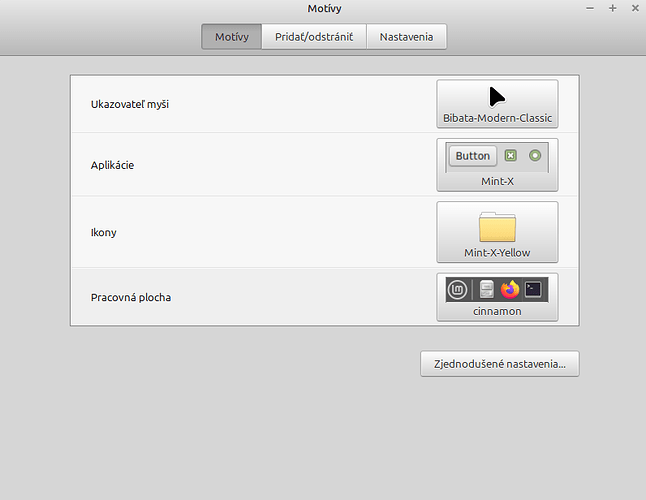
Now, when I am trying to change Lutris to dark mode, it has no effect, it is still in light mode.
I also tried this tutorial, but it didn’t worked. I installed flatseal, added one line “filesystem” section, where I typed ~/.themes. And before it, I typed sudo flatpak override --filesystem=$HOME/.themes in terminal. But I forgot that I don’t have any theme in ~/.theme folder, so I changed that line to /usr/share/themes.
Then I created another line, now in “environment” section and typed GTK_THEME=Mint-L-Dark, but still didn’t work.
I don’t know what I did wrong. Can you help me please?
Here, I am adding more info:
Lutris logs:
[INFO:2025-07-28 16:15:42,928:application]: Starting Lutris 0.5.19
[INFO:2025-07-28 16:15:42,951:startup]: “card1” is Intel Iris Xe Graphics (8086:46a6 1043:277d i915) Driver 25.0.7
[INFO:2025-07-28 16:15:43,085:startup]: “card2” is NVIDIA GeForce RTX 4060 Laptop GPU (10de:28e0 1043:277d nvidia) Driver 550.163.01
[DEBUG:2025-07-28 16:15:43,170:xrandr]: Retrieving resolution list
[DEBUG:2025-07-28 16:15:43,205:xrandr]: Retrieving 59 video modes from XrandR
[DEBUG:2025-07-28 16:15:43,242:path_cache]: Checking for missing games
[DEBUG:2025-07-28 16:15:43,266:api]: Modified at Po 28. júl 2025, 16:06:41, will update after Po 28. júl 2025, 22:06:41
[DEBUG:2025-07-28 16:15:43,267:lutriswindow]: Runtime up to date
[DEBUG:2025-07-28 16:15:44,245:http]: POST https://lutris.net/api/users/library?since=1753711602
[DEBUG:2025-07-28 16:16:32,507:xrandr]: Retrieving display outputs
[DEBUG:2025-07-28 16:16:34,081:xrandr]: Retrieving 59 video modes from XrandR
[DEBUG:2025-07-28 16:16:34,083:xrandr]: Retrieving display outputs
[DEBUG:2025-07-28 16:16:34,112:xrandr]: Retrieving 59 video modes from XrandR
[DEBUG:2025-07-28 16:16:34,114:xrandr]: Retrieving resolution list
[DEBUG:2025-07-28 16:16:34,146:xrandr]: Retrieving 59 video modes from XrandR
[DEBUG:2025-07-28 16:16:34,151:xrandr]: Retrieving resolution list
[DEBUG:2025-07-28 16:16:34,179:xrandr]: Retrieving 59 video modes from XrandR
[DEBUG:2025-07-28 16:16:34,182:xrandr]: Retrieving resolution list
[DEBUG:2025-07-28 16:16:34,213:xrandr]: Retrieving 59 video modes from XrandR
Output from flatpak run net.lutris.Lutris -d:
flatpak run net.lutris.Lutris -d
Gtk-Message: 16:15:42.487: Failed to load module “xapp-gtk3-module”
INFO 2025-07-28 16:15:42,928 [application.do_command_line:478]:Starting Lutris 0.5.19
INFO 2025-07-28 16:15:42,951 [startup.run_all_checks:120]:“card1” is Intel Iris Xe Graphics (8086:46a6 1043:277d i915) Driver 25.0.7
INFO 2025-07-28 16:15:43,085 [startup.run_all_checks:120]:“card2” is NVIDIA GeForce RTX 4060 Laptop GPU (10de:28e0 1043:277d nvidia) Driver 550.163.01
DEBUG 2025-07-28 16:15:43,170 [xrandr.get_resolutions:91]:Retrieving resolution list
DEBUG 2025-07-28 16:15:43,205 [xrandr._get_vidmodes:18]:Retrieving 59 video modes from XrandR
DEBUG 2025-07-28 16:15:43,242 [path_cache._update_missing_games:114]:Checking for missing games
DEBUG 2025-07-28 16:15:43,266 [api.check_stale_runtime_versions:52]:Modified at Po 28. júl 2025, 16:06:41, will update after Po 28. júl 2025, 22:06:41
DEBUG 2025-07-28 16:15:43,267 [lutriswindow.create_runtime_updater_cb:1384]:Runtime up to date
DEBUG 2025-07-28 16:15:44,245 [http._request:88]:POST https://lutris.net/api/users/library?since=1753711602
DEBUG 2025-07-28 16:16:32,507 [xrandr.get_outputs:26]:Retrieving display outputs
DEBUG 2025-07-28 16:16:34,081 [xrandr._get_vidmodes:18]:Retrieving 59 video modes from XrandR
DEBUG 2025-07-28 16:16:34,083 [xrandr.get_outputs:26]:Retrieving display outputs
DEBUG 2025-07-28 16:16:34,112 [xrandr._get_vidmodes:18]:Retrieving 59 video modes from XrandR
DEBUG 2025-07-28 16:16:34,114 [xrandr.get_resolutions:91]:Retrieving resolution list
DEBUG 2025-07-28 16:16:34,146 [xrandr._get_vidmodes:18]:Retrieving 59 video modes from XrandR
DEBUG 2025-07-28 16:16:34,151 [xrandr.get_resolutions:91]:Retrieving resolution list
DEBUG 2025-07-28 16:16:34,179 [xrandr._get_vidmodes:18]:Retrieving 59 video modes from XrandR
DEBUG 2025-07-28 16:16:34,182 [xrandr.get_resolutions:91]:Retrieving resolution list
DEBUG 2025-07-28 16:16:34,213 [xrandr._get_vidmodes:18]:Retrieving 59 video modes from XrandR
System info:
Vulkan support: YES
Esync support: YES
Fsync support: YES
Wine installed: YES
Gamescope: NO
Mangohud: NO
Gamemode: YES
Steam: YES
In Flatpak: YES
[System]
OS: GNOME 46 Flatpak runtime
Arch: x86_64
Kernel: 6.8.0-64-generic
Lutris Version: 0.5.19
Desktop: X-Cinnamon
Display Server: x11
[CPU]
Vendor: GenuineIntel
Model: 12th Gen Intel(R) Core™ i7-12700H
Physical cores: 14
Logical cores: 20
[Memory]
RAM: 15.2 GB
Swap: 26.1 GB
[Graphics]
Vendor: Intel
OpenGL Renderer: Mesa Intel(R) Iris(R) Xe Graphics (ADL GT2)
OpenGL Version: 4.6 (Compatibility Profile) Mesa 25.0.7 (git-742a20f48c)
OpenGL Core: 4.6 (Core Profile) Mesa 25.0.7 (git-742a20f48c)
OpenGL ES: OpenGL ES 3.2 Mesa 25.0.7 (git-742a20f48c)
Vulkan Version: 1.3.261
Vulkan Drivers: Intel(R) Iris(R) Xe Graphics (ADL GT2) (1.4.305), NVIDIA GeForce RTX 4060 Laptop GPU (1.3.277)