I was trying to play Minecraft Dungeons using lutris and default installation worked awfully, i was getting 13FPS and my GPU wasnt getting utilized completely, and i have found a solution
Set versions of different compatibility modules in runner options like this:
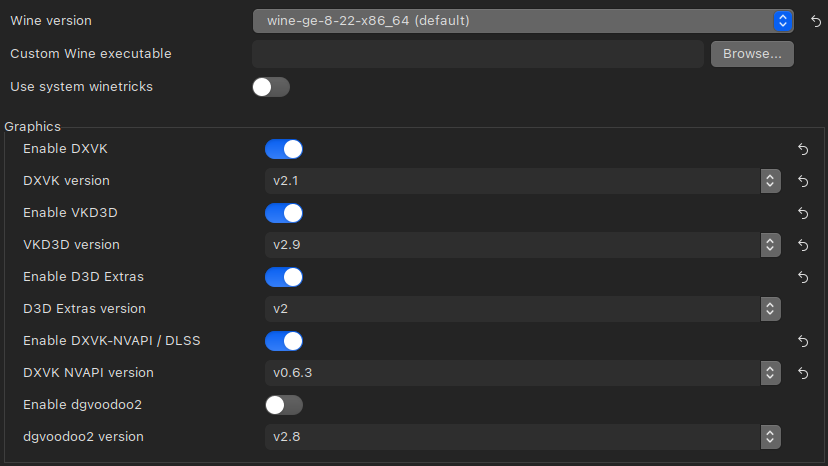
For some reason, it worked.
By default, the versions were latest for DXVK, VK3D and DXVK-NVAPI / DLSS
And as i mentioned before it didnt work well
I guess it is a bug, i hope it gets fixed soon
I will test each version separately to see what causes the issue
Now i just set everything except D3D extras one version lower and it works perfectly
My GPU is GeForce RTX 2060 SUPER and Nvidia driver version is 35.129.03, i installed it using mhwd
OS: Manjaro 64-bit
Kernel version: 6.5.9-1
I use X11 server as my display manager
CPU: Intel Core i7 7700K
I have also disabled Feral Game Mode, changed setting for ICD Vulkan Loader (Set it to my GPU)
I hope my post will be useful for someone <3
I will be happy to provide other information needed for developers to help fixing issues with latest DXVK, VK3D, etc.
Check the comments, as i said earlier i will test different settings and determine which part or version exactly causes the issue