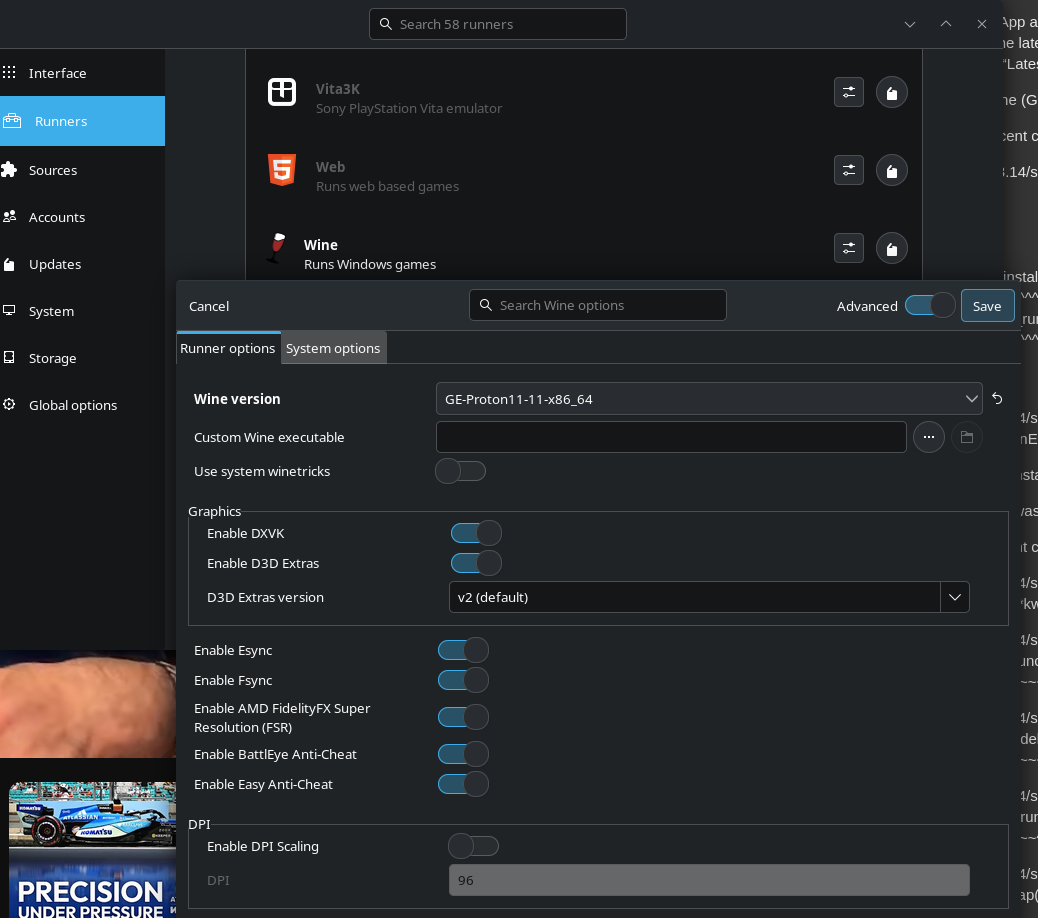
Trying to install EA App and I am receiving this error and below is the dump. I have tried installing ProtonUp and manually installed the latest (11-11) and specifically 11-6. I have gone to preferences and changed my wine runner to 11-6, 11-11 and the “Latest” preset within runner preferences. I’m running the latest version of CachyOS.
Failed to retrieve wine (GE-Proton11-6) information
Traceback (most recent call last):
File “/usr/lib/python3.14/site-packages/lutris/installer/interpreter.py”, line 282, in install_runner
runner.install(
~~~~~~~~~~~~~~^
ui_delegate,
^^^^^^^^^^^^
version=runner.get_installer_runner_version(self.installer),
^^^^^^^^^^^^^^^^^^^^^^^^^^^^^^^^^^^^^^^^^^^^^^^^^^^^^^^^^^^^
callback=install_more_runners,
^^^^^^^^^^^^^^^^^^^^^^^^^^^^^^
)
^
File “/usr/lib/python3.14/site-packages/lutris/runners/runner.py”, line 537, in install
raise RunnerInstallationError(_(“Failed to retrieve {} ({}) information”).format(self.name, version))
lutris.runners.RunnerInstallationError: Failed to retrieve wine (GE-Proton11-6) information
The above exception was the direct cause of the following exception:
Traceback (most recent call last):
File “/usr/lib/python3.14/site-packages/lutris/exception_backstops.py”, line 84, in error_wrapper
return handler(*args, **kwargs)
File “/usr/lib/python3.14/site-packages/lutris/gui/installerwindow.py”, line 502, in launch_install
if not self.interpreter.launch_install(self):
~~~~~~~~~~~~~~~~~~~~~~~~~~~~~~~^^^^^^
File “/usr/lib/python3.14/site-packages/lutris/installer/interpreter.py”, line 215, in launch_install
self.install_runners(ui_delegate)
~~~~~~~~~~~~~~~~~~~~^^^^^^^^^^^^^
File “/usr/lib/python3.14/site-packages/lutris/installer/interpreter.py”, line 269, in install_runners
self.install_runner(self.runners_to_install.pop(0), ui_delegate)
~~~~~~~~~~~~~~~~~~~^^^^^^^^^^^^^^^^^^^^^^^^^^^^^^^^^^^^^^^^^^^^^
File “/usr/lib/python3.14/site-packages/lutris/installer/interpreter.py”, line 289, in install_runner
raise ScriptingError.wrap(ex) from ex
lutris.installer.errors.ScriptingError: Failed to retrieve wine (GE-Proton11-6) information
Lutris log:
[INFO:2026-10-29 09:12:31,346:application]: Starting Lutris 0.5.22
[INFO:2026-10-29 09:12:31,375:startup]: “card1” is AMD Radeon RX 9070 XT (1002:7550 1458:2424 amdgpu) Driver 26.2.5
[INFO:2026-10-29 09:12:31,400:startup]: “card0” is AMD Ryzen 7 9800X3D 8-Core Processor (1002:13c0 1458:d000 amdgpu) Driver 26.2.5
[INFO:2026-10-29 09:13:11,006:interpreter]: Runner wine needs to be installed
[ERROR:2026-10-29 09:13:11,447:interpreter]: Failed to retrieve wine (GE-Proton11-6) information
[ERROR:2026-10-29 09:13:11,447:errors]: Failed to retrieve wine (GE-Proton11-6) information
[ERROR:2026-10-29 09:13:11,447:exception_backstops]: Error handling idle function: Failed to retrieve wine (GE-Proton11-6) information
Traceback (most recent call last):
File “/usr/lib/python3.14/site-packages/lutris/installer/interpreter.py”, line 282, in install_runner
runner.install(
~~~~~~~~~~~~~~^
ui_delegate,
^^^^^^^^^^^^
version=runner.get_installer_runner_version(self.installer),
^^^^^^^^^^^^^^^^^^^^^^^^^^^^^^^^^^^^^^^^^^^^^^^^^^^^^^^^^^^^
callback=install_more_runners,
^^^^^^^^^^^^^^^^^^^^^^^^^^^^^^
)
^
File “/usr/lib/python3.14/site-packages/lutris/runners/runner.py”, line 537, in install
raise RunnerInstallationError(_(“Failed to retrieve {} ({}) information”).format(self.name, version))
lutris.runners.RunnerInstallationError: Failed to retrieve wine (GE-Proton11-6) information
The above exception was the direct cause of the following exception:
Traceback (most recent call last):
File “/usr/lib/python3.14/site-packages/lutris/exception_backstops.py”, line 84, in error_wrapper
return handler(*args, **kwargs)
File “/usr/lib/python3.14/site-packages/lutris/gui/installerwindow.py”, line 502, in launch_install
if not self.interpreter.launch_install(self):
~~~~~~~~~~~~~~~~~~~~~~~~~~~~~~~^^^^^^
File “/usr/lib/python3.14/site-packages/lutris/installer/interpreter.py”, line 215, in launch_install
self.install_runners(ui_delegate)
~~~~~~~~~~~~~~~~~~~~^^^^^^^^^^^^^
File “/usr/lib/python3.14/site-packages/lutris/installer/interpreter.py”, line 269, in install_runners
self.install_runner(self.runners_to_install.pop(0), ui_delegate)
~~~~~~~~~~~~~~~~~~~^^^^^^^^^^^^^^^^^^^^^^^^^^^^^^^^^^^^^^^^^^^^^
File “/usr/lib/python3.14/site-packages/lutris/installer/interpreter.py”, line 289, in install_runner
raise ScriptingError.wrap(ex) from ex
lutris.installer.errors.ScriptingError: Failed to retrieve wine (GE-Proton11-6) information